Civil 3D 2026 Upgrade and State Kit 2026.1.0 Release
Digital Design and Modeling Services is pleased to announce the MDT State Kit and related tools for the 2026 Autodesk Architecture Engineering & Construction Collection are ready for you. Please take a moment to review the information below to help ensure a smooth transition.
MDT Support guides:
Civil 3D 2024 to 2026 Custom Subassemblies and Assemblies
Civil 3D 2024 to 2026 Subassembly Updates
MDT GuideSIGN Start Up Guide
Managing Subassembly Reference Files (PKT) in a DWG and for Projects
Civil 3D 2024 to 2026 DWG Reference Template Updates
Update Excel Manager Base File
Survey Database "Warning for Hybrid Mode"
Explore new features in Autodesk Civil 3D 2026:
What’s New in Civil 3D 2026: Experience New Time-Savings and Performance Gains
MDT State Kit Settings
The MDT Civil 3D State Kit has been adjusted to increase the level of user settings that are maintained between Civil 3D sessions, new drawing sessions, and State Kit reinstallations.
|
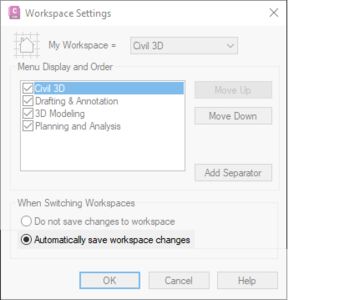
Workspace Settings
Automatically save workspace changes has been activated by default. Among other things, the Ribbon tabs selected upon last closing Civil 3D 2026 will be current on next launch of Civil 3D 2026 Montana. The exception to this is if the MDT Tools and MDT Design tabs were selected.
|
|
 |
Tool Palettes
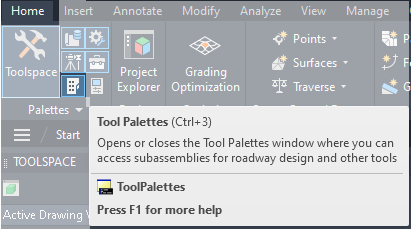
The MDT Start palette will not be autoloaded upon opening a drawing. The status of the Tool Palette menu will remain when opening a new drawing or relaunching Civil 3D 2026 Montana. This includes having the Tool Palettes menu opened or closed.
The Tool Palettes menu can be toggled on/off from the Home tab of the Civil 3D 2026 ribbon.
Note: Initial launch will include two Grading Objects palettes appended to the Tool Palettes menu. They will be suppressed if the palette is reloaded or changed.
|
MDT State Kit Subassemblies
Autodesk Civil 3D 2026 may automatically update subassemblies without user acknowledgment whenever the source PKT files change. To ensure control and avoid unintended design difficulties, we’ve adopted a new naming convention that places the major version at the end of each PKT file name. When major updates occur, the file name and the version are updated, allowing the user to control the desired subassembly version. See the Managing Subassembly Reference Files (PKT) in a DWG and for Projects guide for more information.
Excel Manager
The MDT Excel Manager was updated to reference new Autodesk vba libraries, use 2026 paths for vba source data, and correct an error handler issue.
It is advised that all Road Design Quantity Manager base files showing MDT Excel Manager versions MDT 2024: v01.00.01 and earlier be updated to use the latest template. This would include any and all files created prior to this Civil 3D 2026 upgrade. Refer to the Update Excel Manager Base File guide for help.
Not updating the base file will result in errors as follows:
- Default Frames Path Error
- Unexpected Civil 3D is Not Ready warning
- Microsoft Visual Basic for Applications Compile errors (various)
Survey Database "Warning for Hybrid Mode"
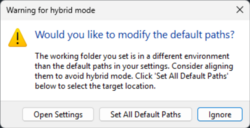
A new warning occurs with Civil 3D 2026 when editing the survey database path. Selecting the Set All Default Paths options will reset MDT State Kit paths breaking links to the linework code set and figure prefix database. It's advised to always choose Ignore on this warning for MDT State Kit processes. Support guide Survey Database "Warning for Hybrid Mode" is available for further information.
|
 |
|
We invite you to Open a Case from the MDT Service Desk (linked below) if you have any questions or issues. Internal MDT users may submit a case or make a request from the MDT Service Desk.
|
|