|
|
UI eServices for Employers Changes are Here!
You are receiving this email because you currently use or have used UI eServices for Employers to conduct Unemployment Insurance related business in Montana.
Effective today, June 1, 2020, our UI eServices for Employers homepage has a new look and a streamlined process for logging in. Accessing eServices can no longer be done through ePass Montana.
If you haven’t already, we recommend logging into eServices today, or soon, to ensure you are ready for the next filing period.
|
|
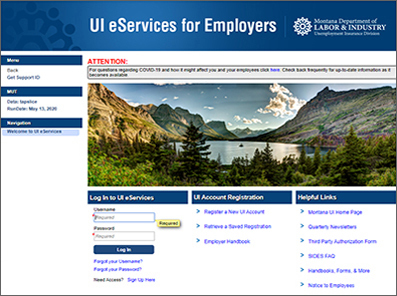 Screenshot of the new UI eServices for Employers website.
|
|
To log into your existing eServices profile for the first time after today you will need:
- Your username (the one you created through the old ePass process),
- Your eServices Secret Answer (the second password you’ve needed to get into eServices), and
- An authentication code.
|
|
|
An authentication code will be sent to the email address we have associated to your login profile (username), when you log in.
Review our UI eServices Help Tools for a short video and instructions on how existing eServices users can get logged in using the new method. Please Note: The video and instructions have been updated to adjust for a last-minute change that occurred over the weekend. If you reviewed the tools last week, you may want to review them again.
If you are a third-party administrator with access to multiple client accounts, review these additional instructions.
For questions regarding UI eServices for Employers email uieservices@mt.gov or call (406) 444-3834, select option 2.
Montana Department of Labor & Industry
Unemployment Insurance Division
|
|
|
|