|
November 5, 2026
For users of SWIFT Accounting and Procurement modules and those who use SWIFT data in the EPM Data Warehouse.
Contents
|
|
|
U.S. Bank charges late fees on past due PCard accounts. Agencies are invoiced up to 1% per month on the amount overdue, or a minimum of $2. Late fees are included on your monthly statement from U.S. Bank and available to view in SWIFT. However, the Late Payment transaction cannot be reconciled the same way other transactions are reconciled.
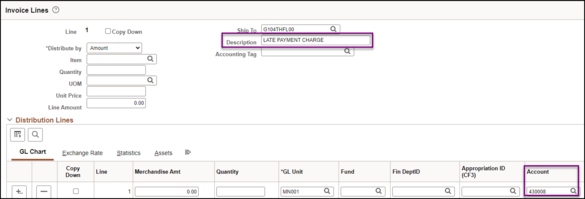
To pay a late fee associated with a PCard statement, agencies must manually add this fee to their monthly PCard voucher by adding a line and entering the information. Make sure to enter Late Payment Charge in the Description field. In the Account field use Expense code 430008 (Interest Pd To Vend Late Pymt). After the line has been added, provide the voucher number to the SWIFT Help Desk to have the transaction removed from the PCard pages.
 As a reminder, pay PCard statements on time to avoid potential late fees, take advantage of available rebates, and avoid potential violations of Minn. Stat. § 16A. Purchasing Policy 1b requires that Purchasing Card Coordinators use Access Online to review statements and monitor account activity.
If you have questions regarding PCards, please contact the SWIFT Help Desk.
For questions regarding the state contract or Purchasing Card Use Policy 1b, please contact Robbyn Overall.
|
|
|
Help Desk Hot Topics feature Frequently Asked Questions (FAQs) answered by the SWIFT Help Desk. Use these as a friendly reminder of a process or as an opportunity to learn something new!
Q. Where can I find SWIFT forms, such as Budget Forms, Vendor Payment Forms, or General Procurement Forms?
A. On MMB's website, all SWIFT forms are located on the SWIFT Forms webpage. You can browse this page to find the Budget (like SWIFT Accounting Tag Template), Vendor Payment, Tax forms for Business with State of Minnesota (like W9 Fill-able), Account Payable Agency Origin, or General Procurement Forms that you need.
|
|
|
The State of Minnesota continues to partner with U.S. Bank and the U.S. Bank’s Virtual Payment Plus program in SWIFT. Virtual Payment Plus utilizes U.S. Bank’s commercial credit card program. It allows suppliers who have opted into the program to receive payments via secure delivery of automated Visa card payments.
Minnesota Management and Budget, working with U.S. Bank, annually reviews and identifies a list of suppliers we believe are suitable for this program and contacts them. Enrollment is optional and is limited to suppliers receiving payments via state warrant. Suppliers receiving payments via ACH or non-business entities are not included in the enrollment campaign.
Benefits of This Initiative
This initiative is beneficial to both the State of Minnesota and our suppliers.
Key benefits that State of Minnesota receives from expanding our card program are:
- Reduced costs from a streamlined payment process
- Improved cash flow
- Increased credit card rebates from U.S. Bank based on level of spend
Key benefits our suppliers receive from accepting Visa payments from the State of Minnesota include:
- Accelerated payment and improved cash flow
- Reduced paperwork and streamlined accounts receivable process
- Real-time email notifications for each card payment
- Complete remittance detail to support efficient receivables posting
- No changes or modifications to their existing card acceptance procedures
How it Works
The current payment process for suppliers enrolled in this program remains unchanged. Vouchers to suppliers enrolled in Virtual Payments Plus will default to the virtual payments pay cycle with net pay terms of 000. With the new payment process, our suppliers will receive an email notification for each payment instructing them of the card account, the amount to process using their Point-of-Sale device/software, and other pertinent details of the transaction.
Contact Information
Agencies may receive questions from suppliers that have enrolled in the U.S. Bank Payment Plus Program. Please refer suppliers to the US Bank Payments Plus Processing Guide. Suppliers can also contact PaymentPlus@access-online.com or call 855-268-5386.
For expired payment authorizations (45 days), contact syscomp.mmb@state.mn.us to request the payment to be reissued.
|
|
|
The SWIFT Training and AM teams are building future learning opportunities for the AM module. We'd love to hear what matters most to you.
- What would you like to learn about the SWIFT AM module?
- What challenges do you run into?
- What sort of future training opportunities do you want to see?
Join us Wednesday, November 18, for the Asset Management Lab to share your ideas and help shape upcoming training.
Go to Learning Management and search for "SWIFT Asset Management Lab" to enroll.
|
|
|
The SWIFT Training team offers SWIFT module training through a variety of methods at no additional cost to the agency. There are SWIFT training guides and training videos, webinars, eLearning, and individual sessions (by request through the SWIFT Help Desk).
Find current SWIFT training in Learning Management. Enter "SWIFT" in the Find Learning text entry box.
Module
|
SWIFT Webinars & eLearning
Sessions run 9:00 - 10:30 a.m., unless otherwise noted
|
Dates
|
|
Intro
|
Introduction to SWIFT Navigation webinar
|
12/9/26
|
|
Intro
|
Introduction to SWIFT Navigation eLearning
|
Anytime
|
|
Intro
|
Overview of SWIFT Reporting webinar
|
11/19/26; 12/17/26
|
|
AM
|
Asset Management Lab
|
11/18/26
|
|
AR
|
SWIFT Accounts Receivable: Processing Returned Items (NSF)s webinar
|
12/2/26
|
|
AP
|
SWIFT Vouchers and Accounts Payable Overview webinar
|
11/10/26; 2/19/26
|
|
EPro
|
SWIFT Create a Catalog Punchout Requisition webinar
|
11/17/26
|
|
PO
|
SWIFT Purchase Orders Overview webinar
|
12/15/26
|
|
SS
|
SWIFT Strategic Sourcing eLearning
|
Anytime
|
|
|
|
The SWIFT Training team offers EPM Data Warehouse training for SWIFT data through a variety of methods at no additional cost to the agency. There are EPM training guides, videos, labs, and individual sessions (by request through the SWIFT Help Desk).
Find current EPM Data Warehouse training in Learning Management. Enter "EPM" in the Find Learning text entry box.
EPM Data Warehouse Labs
Sessions run 9:00 - 10:30 a.m., unless otherwise noted
|
Dates
|
|
Introduction to the EPM Data Warehouse for SWIFT Data webinar
|
12/3/26
|
|
SWIFT EPM the All Receipts Report Lab
|
12/16/26
|
|
SWIFT EPM the Manager's Financial Report Lab
|
11/12/26
|
|
SWIFT EPM a New Analysis Lab
|
11/24/26
|
|
SWIFT EPM Format Your Report lab
|
12/10/26
|
|
SWIFT EPM Use Standard Reports and Understand the Data webinar
|
12/9/26
|
|
|
|
Contact the SWIFT Help Desk for any SWIFT-related questions or issues.
Email: SWIFTHelpDesk.MMB@state.mn.us
Phone: 651-201-8100, option 2
Hours: 7:30 a.m. to 4:00 p.m., Monday through Friday (closed holidays)
When contacting the SWIFT Help Desk, make sure to include details about your question or issue, including:
- Your Business Unit
- Description of the issue/question
- SWIFT Module (Accounts Payable, Purchase Orders, etc.)
- Transaction ID (Voucher ID, PO ID, etc.)
- Error message print screen
Additional assistance can be found on the SWIFT Training Guides and Resources page.
|
|
|
Maintenance Window: SWIFT is unavailable during the statewide systems maintenance window, every Sunday from 6:00 AM - 2:00 PM.
We want to hear from you! Email the SWIFT Training and Help Desk team using the button below to share your ideas or suggestions about improving user experiences with our systems, training opportunities, newsletter notifications, or system issues.
|
|
|
All current SWIFT users should receive the SWIFT Update for timely notifications of important deadlines, upcoming system upgrades, scheduled maintenance, and training opportunities. Let us know if someone on your team is not receiving important updates or news from us.
|
|
|
|
|