|
Help Desk Hot Topics feature Frequently Asked Questions (FAQs) answered by the SWIFT Help Desk. Use these as a friendly reminder of a process or as an opportunity to learn something new!
Q. How can I tell if a voucher has been paid?
A. There are several ways to determine whether a voucher has been paid. The two most commonly used are outlined below.
Option 1: View Payments tab
1. Go to Regular Entry Voucher page.
2. Select Find an Existing Value button, enter Business Unit and Voucher ID, select Search.
3. Select Payments.
4. Review Schedule Payment section.
a. If there is a Payment Date and Reference number showing, the voucher has been paid.
b. If there is no Payment Date or Reference number showing, the voucher has not been paid.
 Option 2: View Payment Inquiry
1. Go to Payment Inquiry page.
2. Enter at least two search terms for the voucher, select Search.
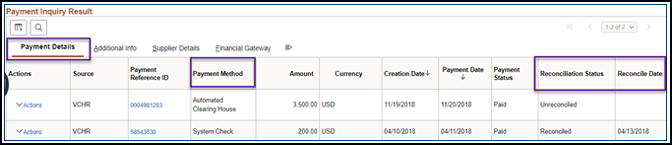
3. Review Payment Details tab information.
Note: If there is data that matches your criteria, the Payment Inquiry Results table appears. If there are no payments, the table will not appear.
a. If the Reconciliation Status is listed as “Reconciled”, this means the warrant (check) is cashed or
the virtual payment was processed. The Reconcile Date will equal the date the warrant was cashed
or the virtual payment was processed.
b. If the Reconciliation Status is listed as “Unreconciled”, this means the warrant (check) remains
outstanding. All ACH payments remain in an "Unreconciled" status.
 See Payment Inquiry Quick Reference Guide for more details.
For additional payment status search options in SWIFT, including queries, review the Research Unpaid Vouchers and Run SWIFT Queries for Account Payable Data Quick Reference Guides.
Reminder: Suppliers enrolled in the U.S. Bank Virtual Payments Plus Program follow the new payment process, including email notifications for each card payment. See the Single Use Account Processing Instructions for more information.
|