|
October 15, 2026
For users of SWIFT Accounting and Procurement modules and those who use SWIFT data in the EPM Data Warehouse.
Contents
|
|
|
SWIFT Accounts Receivable: Processing Returned Items (NSF)s.
Have you received a returned item in the SWIFT Accounts Receivable module and found yourself confused or frustrated trying to process it correctly? You’re not alone. Returned items come from multiple sources and often arrive with different types of notifications, making it challenging to know exactly what steps to take.
Join us for a new webinar on December 2, 2026, that offers clear, practical guidance for navigating these situations. Participants learn how to identify return notifications, locate the related deposit in SWIFT, and complete the return accurately. Through demonstrations and guided explanations, the session supports users in understanding returned‑item scenarios and how these transactions impact financial reporting.
This course is appropriate for both new users and experienced staff seeking a refresher on return procedures in SWIFT.
|
|
|
It is possible to attach documents to certain transactions in SWIFT. Attaching a document to a particular transaction may be required or useful, for example, to support an approval request. We want to remind you that SWIFT is not a suitable long-term storage repository for your documents. Please use other storage options, such as shared drives and SharePoint for document retention.
|
|
|
Do you have a new team member or know of someone who has new SWIFT roles? Suggest they subscribe to the weekly SWIFT Update to stay current on SWIFT news, help topics, and available training.
Users can go to the MMB Email List (GovDelivery) page to subscribe to the SWIFT Update email list, and find out more about other available topics and bulletins.
|
|
|
While entering budget journals in the Commitment Control module, you may be called away, or your session may time out. The Enter Budget Journal page can be used to search for budget journals that are not fully processed. You should perform this search on a routine basis to ensure that there are no budget journals waiting to be processed.
1. Go to the Enter Budget Journals page and select the Find an Existing Value button
2. Enter MN001 in the Business Unit field. MN001 is the only business unit used in the Commitment Control module.
3. To search for unfinished journals, change the operator to "not =" in the Budget Header Status field and select “Posted” from the drop-down menu.
4. In the Source field, enter your 3-digit agency code (also the first 3 characters of your business unit).
5. Select the Search button.
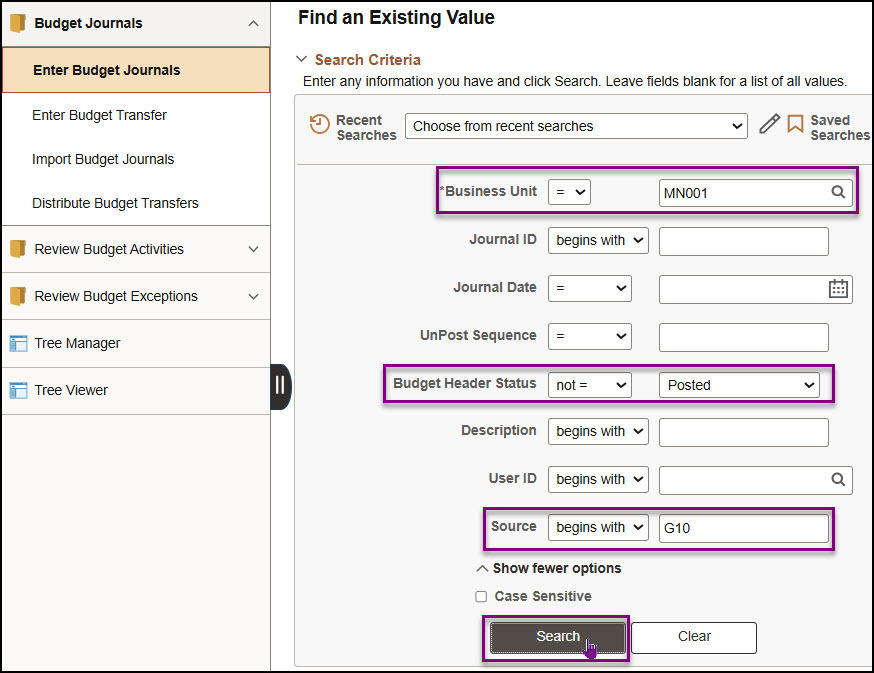 6. If more than one result is returned, select an entry in the Search Results section.
7. The Budget Header page for the budget journal displays. Determine the next processing step and process as you would normally. Refer to the Enter Expense Budget Journals or Enter Revenue Budget Journals Quick Reference Guides for those detailed instructions.
Note: If you wish to delete the journal, select the “Delete Journal” option in the Process field on the Budget Lines tab.
See the Search Unfinished Budget Journals Quick Reference Guide for more information.
|
|
|
The SWIFT Training team offers SWIFT module training through a variety of methods at no additional cost to the agency. There are SWIFT training guides and training videos, webinars, eLearning, and individual sessions (by request through the SWIFT Help Desk).
Find current SWIFT training in Learning Management. Enter "SWIFT" in the Find Learning text entry box.
Module
|
SWIFT Webinars & eLearning
Sessions run 9:00 - 10:30 a.m., unless otherwise noted
|
Dates
|
|
Intro
|
Introduction to SWIFT Navigation webinar
|
11/4/26; 12/9/26
|
|
Intro
|
Introduction to SWIFT Navigation eLearning
|
Anytime
|
|
Intro
|
Overview of SWIFT Reporting webinar
|
10/22/26; 11/19/26
|
|
AM
|
SWIFT Asset Management Lab
|
11/18/26
|
|
AR
|
SWIFT Accounts Receivable Part A: Direct Journal Deposits
|
10/27/26
|
|
AR
|
SWIFT Accounts Receivable Part B: Apply Payments to Invoices
|
10/28/26
|
|
AR
|
SWIFT Accounts Receivable Part C: Maintenance Worksheets
|
10/29/26
|
|
AR
|
SWIFT Accounts Receivable: Processing Returned Items (NSF)s
|
12/2/26
|
|
AP
|
SWIFT Vouchers and Accounts Payable Overview webinar
|
11/10/26
|
|
BI
|
SWIFT Billing Part 1
|
11/4/26
|
|
BI
|
SWIFT Billing Part 2
|
11/5/26
|
|
EPro
|
SWIFT Create a Catalog Punchout Requisition webinar
|
11/17/26
|
|
KK
|
SWIFT Budget Journal Administration Part 1
|
10/20/26
|
|
KK
|
SWIFT Budget Journal Administration Part 2
|
10/21/26
|
|
PO
|
SWIFT Purchase Orders Overview webinar
|
12/15/26
|
|
SS
|
SWIFT Strategic Sourcing eLearning
|
Anytime
|
|
|
|
The SWIFT Training team offers EPM Data Warehouse training for SWIFT data through a variety of methods at no additional cost to the agency. There are EPM training guides, videos, labs, and individual sessions (by request through the SWIFT Help Desk).
Find current EPM Data Warehouse training in Learning Management. Enter "EPM" in the Find Learning text entry box.
EPM Data Warehouse Labs
Sessions run 9:00 - 10:30 a.m., unless otherwise noted
|
Dates
|
|
SWIFT EPM the Manager's Financial Report lab
|
11/12/26
|
|
SWIFT EPM a New Analysis lab
|
11/12/26
|
|
SWIFT EPM Format Your Report lab
|
12/10/26
|
|
|
|
Maintenance Window: SWIFT is unavailable during the statewide systems maintenance window, every Sunday from 6:00 AM - 2:00 PM.
We want to hear from you! Email the SWIFT Training and Help Desk team using the button below to share your ideas or suggestions about improving user experiences with our systems, training opportunities, newsletter notifications, or system issues.
|
|
|
All current SWIFT users should receive the SWIFT Update for timely notifications of important deadlines, upcoming system upgrades, scheduled maintenance, and training opportunities. Let us know if someone on your team is not receiving important updates or news from us.
|
|
|
|