|
September 3, 2026
For users of SWIFT Accounting and Procurement modules and those who use SWIFT data in the EPM Data Warehouse.
Contents
|
|
|
Even though the PeopleTools upgrade and move to OCI went well, users are still experiencing issues the first time they log in to Self Service or the Admin Portal. For most users, this happens because they did not clear their browser cache or delete browsing history and data.
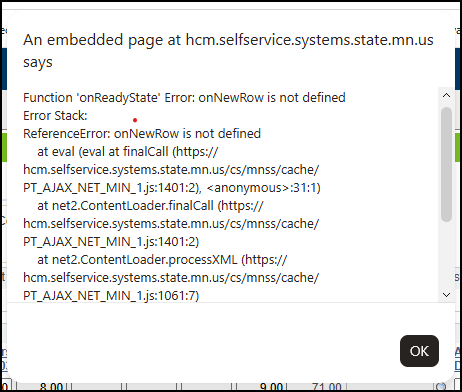
If you see the error shown below, please make sure you have fully cleared your browser cache and correctly deleted your browsing history and data.
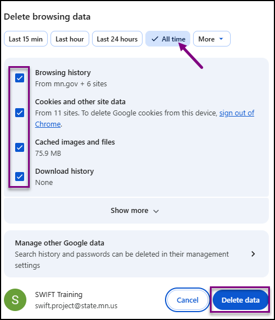
 To fully clear your browser cache and remove browsing history and data, sign out of the Admin Portal or the Self Service Portal, and then open your browser’s Settings menu (the three-dot icon). Select Delete browsing data, choose All Time in the Time range field, and check the options for Browsing history, Cookies and other site data, Cached images and files, and Download history. Select Delete Data, close your browser completely, then reopen it and sign back in.
The image shown below is from Google Chrome. If you are using Microsoft Edge or Firefox, the steps are similar. More detailed instructions can be found in the Clear Browsing Data and History Quick Reference Guide or the Video Tutorial on clearing cache and deleting browsing history in any browser.
 If this is not successful, only then request a ticket through the SWIFT Help Desk.
|
|
|
Monday, August 31 marked an exciting milestone for our statewide systems, including SWIFT. We successfully completed the PeopleTools upgrade and move to Oracle Cloud Infrastructure (OCI). Thanks to all agency staff involved for your collaboration, patience, and commitment throughout this process. We especially appreciate your flexibility as we worked through issues immediately following go-live.
|
|
|
If you receive a “First Operand of NULL” error when trying to complete a Punchout order, it means your browser is unable to submit the request. Until the issue is resolved, users can successfully submit Punchout orders using the Firefox browser. Our technical team is actively working on a solution for Chrome and Edge. We will notify you as soon as the issue is fixed.
|
|
|
The system is currently experiencing issues with sending SWIFT Event emails, including the Event Preview PDF and posting confirmation emails.
These emails are not being delivered as expected, which may impact users’ ability to review event details and confirm successful posting.
We are actively working on getting this fixed and will provide updates as we have them.
|
|
|
SWIFT can send you notifications in two ways:
- In the Notifications panel inside SWIFT (the flag icon)
- To your email address
You can turn these notifications on or off in My Preferences.
To change your notification settings:
- Select the More Options icon (the three vertical dots) in the Global Menu.
- Choose My Preferences.
- In the left menu, select Notifications.
You will see the types of approvals available to you based on your role.
- In the In-App column, slide the switch to “Yes” if you want notifications to appear in SWIFT. Slide to “No” to turn them off.
- In the Email column, slide the switch to “Yes” if you want to receive notifications in your email inbox. Slide to “No” to turn off email notifications.
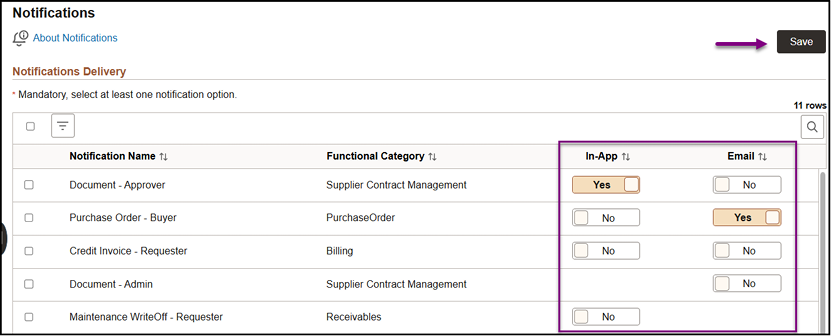 See the Turn On or Off Approval Notifications Quick Reference Guide for more detail.
|
|
|
Consider taking our training webinars and check out our other training materials!
The SWIFT training team offers a wide range of webinars and labs related to SWIFT transactions as well as SWIFT data in the EPM Data Warehouse. Find and register for them through the Self-Service component, Learning Management (ELM). Enter “SWIFT” in the Find Learning text box. There is no cost to your agency.
- Webinars include:
-
Introduction to SWIFT Navigation. This webinar introduces you to the Statewide Integrated Financial Tools (SWIFT) system. If you are new, take this webinar before taking other SWIFT webinars.
-
Overview of SWIFT Reporting. This webinar provides an overview how to get information from SWIFT. We cover inquiries, queries, reports, and the various support tools.
-
Introduction to the EPM Data Warehouse for SWIFT. This webinar introduces you to the Enterprise Performance Management (EPM) Data Warehouse, a reporting platform for the State of Minnesota. We cover key concepts, basic navigation, and shared SWIFT reports and data. This webinar is highly recommended before taking other EPM Data Warehouse for SWIFT webinars or labs.
See the calendar at the end of this newsletter for more details! Psst. Many users suggest taking our webinars more than once.
If you have any questions or suggestions regarding training, contact the SWIFT Help Desk Email: mailto:swifthelpdesk.mmb@state.mn.us.
|
|
|
The SWIFT Training team offers SWIFT module training through a variety of methods at no additional cost to the agency. There are SWIFT training guides and training videos, webinars, eLearning, and individual sessions (by request through the SWIFT Help Desk).
Find current SWIFT training in Learning Management. Enter "SWIFT" in the Find Learning text entry box.
Module
|
SWIFT Webinars & eLearning
Sessions run 9:00 - 10:30 a.m., unless otherwise noted
|
Dates
|
|
Intro
|
Introduction to SWIFT Navigation webinar
|
9/9/26; 10/7/26; 11/4/26
|
|
Intro
|
Introduction to SWIFT Navigation eLearning
|
Anytime
|
|
Intro
|
Overview of SWIFT Reporting webinar
|
9/24/26; 10/22/26
|
|
AP
|
SWIFT Vouchers and Accounts Payable Overview webinar
|
11/10/26
|
|
PO
|
SWIFT Purchase Orders Overview webinar
|
10/6/26
|
|
SS
|
SWIFT Strategic Sourcing eLearning
|
Anytime
|
|
|
|
The SWIFT Training team offers EPM Data Warehouse training for SWIFT data through a variety of methods at no additional cost to the agency. There are EPM training guides, videos, labs, and individual sessions (by request through the SWIFT Help Desk).
Find current EPM Data Warehouse training in Learning Management. Enter "EPM" in the Find Learning text entry box.
EPM Data Warehouse Labs
Sessions run 9:00 - 10:30 a.m., unless otherwise noted
|
Dates
|
|
SWIFT EPM Create and Save an All Expenditures Report lab
|
9/9/26
|
|
SWIFT EPM Format Your Report lab
|
9/17/26
|
|
|
|
Maintenance Window: SWIFT is unavailable during the statewide systems maintenance window, every Sunday from 6:00 AM - 2:00 PM.
We want to hear from you! Email the SWIFT Training and Help Desk team using the button below to share your ideas or suggestions about improving user experiences with our systems, training opportunities, newsletter notifications, or system issues.
|
|
|
All current SWIFT users should receive the SWIFT Update for timely notifications of important deadlines, upcoming system upgrades, scheduled maintenance, and training opportunities. Let us know if someone on your team is not receiving important updates or news from us.
|
|
|
|
|