|
August 27, 2026
For users of SWIFT Accounting and Procurement modules and those who use SWIFT data in the EPM Data Warehouse.
Contents
|
|
|
To keep our statewide systems current, Minnesota Management and Budget, the Department of Administration, and Minnesota IT Services are upgrading the technology that supports all statewide applications. As part of this work, the systems will be updated to the latest version of PeopleTools, the technology that runs PeopleSoft applications. The systems are also being moved to Oracle Cloud Infrastructure (OCI), which is expected to improve processing speed and overall system performance.
The launch date for this project is Monday, August 31, 2026. All statewide systems will be unavailable due to the system-wide upgrade beginning Thursday, August 27, 2026, starting at 4:30 p.m., through Monday, August 31 at 6 a.m. Please plan around this time to minimize the interruption of critical business functions. We apologize for the inconvenience.
Important note for Buyers in SWIFT: Please ensure that your events are not scheduled to start or end during this time as the Supplier Portal will be unavailable.
Note for Daily Interface Uploads: The daily interfaces will only be loaded up until Thursday evening, 8/27/26, at 6:00 PM. They will resume loading SWIFT on Monday morning, 8/31/2026, at 8:00 AM. All files sent in between these dates will sit in pending status on the mainframe FTP site. Agencies that send files with static filenames will need to be mindful of overwriting files that they have already sent to the mainframe FTP site but that haven’t been loaded between these dates due to the upgrade.
Impacted systems include:
- Appropriate Maintenance Application (AMA)
- Budget Planning and Analysis System (BPAS)
- Capital Budget System (CBS)
- EPM Data Warehouse
- Fiscal Note Tracking System (FNTS)
- Learning Management (ELM)
- Recruiting Solutions
- Self Service
- SEMA4
- SWIFT (Including Supplier Portal and Mobile Inventory)
Users must clear their internet browsing history and cache before they log into these systems on Monday, August 31.
If you experience difficulties trying to log in, view data, or access data in any of the statewide systems mentioned above, deleting your browsing data and history may help resolve these issues.
Thank you,
MMB Systems Team
|
|
|
In preparation for the PeopleTools upgrade and the move to OCI, remember to use and save vanity links to access statewide system portals. A 'vanity URL' is a shorter URL that is more descriptive and automatically redirects a user to the application. Please save these URLs in your browser favorites and use them for communications to employees or suppliers. These shorter URLs replace the need for the much longer and sometimes changing portal URLs.
The following portals have vanity URLs:
For instructions on how to save these links to your browser's Favorites, see the Save Vanity URLs Quick Reference Guide. This guide includes instructions for Microsoft Edge, Chrome, and Firefox.
If you have questions about how to save favorites in your browser, contact the SWIFT Help Desk.
Use the Clear Browsing Data and History Quick Reference Guide or Video Tutorial for step by step instructions. If this doesn't work, only then request a ticket through the SWIFT Help Desk.
|
|
|
Some users experienced errors when signing in to the Administrative, Self Service, and Supplier portals for the first time after the upgrade. Users report a variety of symptoms including:
- SWIFT or other system pages fail to load, do not load correctly, or display the “404 Error” message.
- Missing tiles.
- Unexpected errors in a SWIFT transaction.
- Expired passwords (Note: select the forgot password link after clearing browsing data).
Please remember to Delete browsing data. The vast majority of the issues experienced are resolved by doing so correctly. Correctly means that you log out, delete browsing data by choosing the "All Time" option in the Time range field, and be sure to include Browsing history, Cookies and other site data, Cached images and files, and Download history. After clearing browsing data, close the browser, reopen the browser, and sign back in.
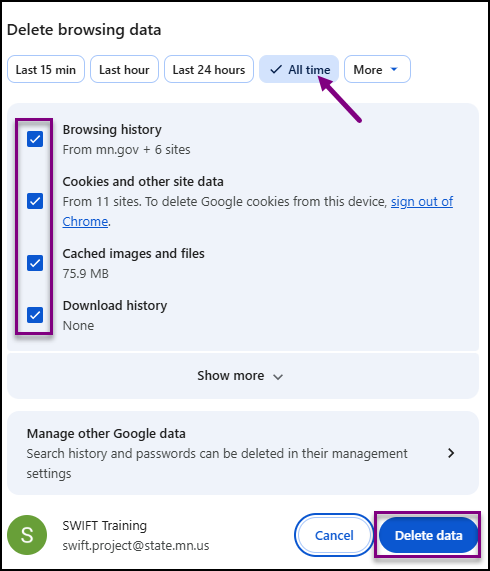 Use the Clear Browsing Data and History Quick Reference Guide or Video Tutorial for step by step instructions. If this doesn't work, only then request a ticket through the SWIFT Help Desk.
|
|
|
The SWIFT Training team offers SWIFT module training through a variety of methods at no additional cost to the agency. There are SWIFT training guides and training videos, webinars, eLearning, and individual sessions (by request through the SWIFT Help Desk).
Find current SWIFT training in Learning Management. Enter "SWIFT" in the Find Learning text entry box.
Module
|
SWIFT Webinars & eLearning
Sessions run 9:00 - 10:30 a.m., unless otherwise noted
|
Dates
|
|
Intro
|
Introduction to SWIFT Navigation webinar
|
9/9/26; 10/7/26; 11/4/26
|
|
Intro
|
Introduction to SWIFT Navigation eLearning
|
Anytime
|
|
Intro
|
Overview of SWIFT Reporting webinar
|
9/24/26; 10/22/26
|
|
AP
|
SWIFT Vouchers and Accounts Payable Overview webinar
|
11/10/26
|
|
PO
|
SWIFT Purchase Orders Overview webinar
|
10/6/26
|
|
SS
|
SWIFT Strategic Sourcing eLearning
|
Anytime
|
|
|
|
The SWIFT Training team offers EPM Data Warehouse training for SWIFT data through a variety of methods at no additional cost to the agency. There are EPM training guides, videos, labs, and individual sessions (by request through the SWIFT Help Desk).
Find current EPM Data Warehouse training in Learning Management. Enter "EPM" in the Find Learning text entry box.
EPM Data Warehouse Labs
Sessions run 9:00 - 10:30 a.m., unless otherwise noted
|
Dates
|
|
SWIFT EPM Create and Save an All Expenditures Report lab
|
9/9/26
|
|
SWIFT EPM Create and Save an All Receipts Report lab
|
9/2/26
|
|
SWIFT EPM Format Your Report lab
|
9/6/26
|
|
|
|
Maintenance Window: SWIFT is unavailable during the statewide systems maintenance window, every Sunday from 6:00 AM - 2:00 PM.
We want to hear from you! Email the SWIFT Training and Help Desk team using the button below to share your ideas or suggestions about improving user experiences with our systems, training opportunities, newsletter notifications, or system issues.
|
|
|
All current SWIFT users should receive the SWIFT Update for timely notifications of important deadlines, upcoming system upgrades, scheduled maintenance, and training opportunities. Let us know if someone on your team is not receiving important updates or news from us.
|
|
|
|
|