|
April 16, 2026
For users of SWIFT Accounting and Procurement modules and those who use SWIFT data in the EPM Data Warehouse.
Contents
|
|
|
As part of the deposit process in the Accounts Receivable module in SWIFT, it is important to look for incomplete deposits on a regular basis.
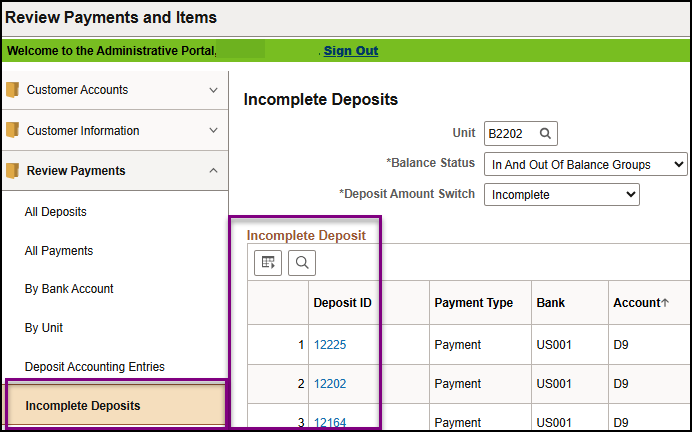
- To check for incomplete deposits, both Direct Journal and Regular Item deposits, navigate to the Review Payments and Items tile. Navigation: Accounting, Accounts Receivable, Review Payments and Items, Incomplete Deposits.
- Expand the Review Payments folder and select Incomplete Deposits.
- Select the Search button.
- A list of any incomplete deposits will display. Select on of the Deposit ID hyperlinks for more information.
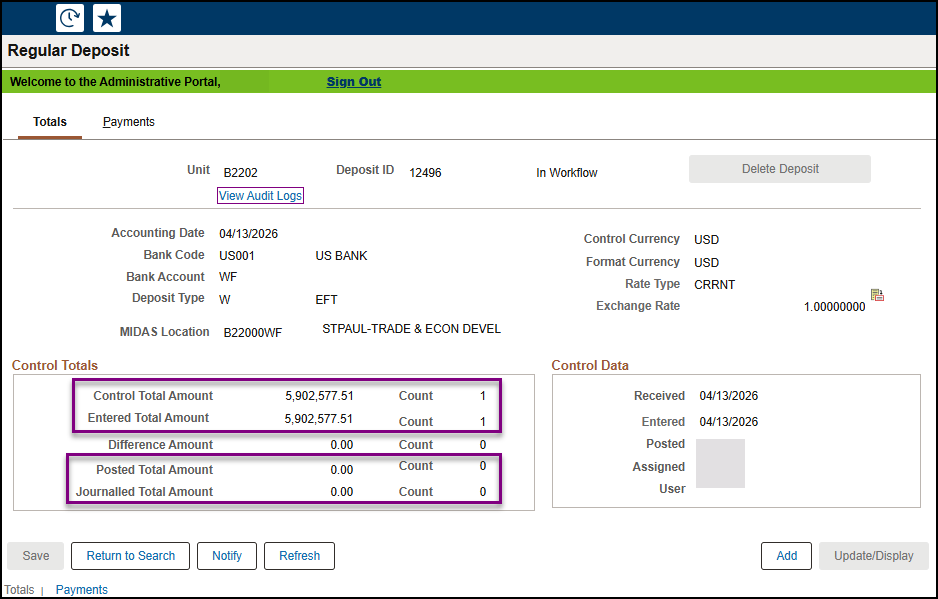
- The Totals page will display. In the Control Totals section, verify that the Posted Total Amount and/or the Journalled Total Amount equal the Control Total Amount and Entered Total Amount.
- If they do not, complete the deposit by either applying payments for a regular item deposit or entering accounting entries for a direct journal deposit.
 For more detailed information, refer to the Verify Deposits are Complete Quick Reference Guide.
|
|
|
Help Desk Hot Topics feature Frequently Asked Questions (FAQs) answered by the SWIFT Help Desk. Use these as a friendly reminder of a process or as an opportunity to learn something new!
Q: What is the Bilateral Netting Policy?
A: The Bilateral Netting Policy allows state agencies to complete transactions between other state agencies without creating payments (checks or ACH) or deposits in the Treasury. Agencies must use the Bilateral Netting Process in SWIFT when making interagency payments (one agency paying another agency).
The Bilateral Netting process requires the billing (BI) agency to create a bill in SWIFT, and the paying agency to enter a voucher that references the Invoice ID and the dollar amount shown on the bill. The Invoice ID and the dollar amount on the voucher must match exactly to the bill. All agencies making interagency payments are required to use bilateral netting.
There are some exceptions to this policy. Exceptions include:
- Minnesota State Colleges and Universities do not always use Treasury for revenue.
- Department of Revenue (DOR) payments for Entertain and Speaker fees and revenue recapture.
- Intra-agency payments (payments within a single agency).
- Negative interagency vouchers.
Please refer to the 0805-01 Interagency Payment Policy for more information regarding these exceptions, or with further questions or details on the Bilateral Netting Policy.
|
|
|
Suppliers (also known as vendors or bidders) refer to individuals or organizations that do business with the State of Minnesota. Generally, suppliers are entities that provide goods and services to the State of Minnesota but also includes anyone who receives payments from the State. Suppliers can view events, make bids, and review payments on the Supplier Portal.
Check out the SWIFT Vendor Resources page for the Supplier Portal and more information, including common supplier, vendor, and payee questions and topics, who to contact, and how to reach all supplier contacts.
|
|
|
The SWIFT Training team offers SWIFT module training through a variety of methods at no additional cost to the agency. There are SWIFT training guides and training videos, webinars, eLearning, and individual sessions (by request through the SWIFT Help Desk).
Find current SWIFT training in Learning Management. Enter "SWIFT" in the Find Learning text entry box.
Module
|
SWIFT Webinars & eLearning
Sessions run 9:00 - 10:30 a.m., unless otherwise noted
|
Dates
|
|
Intro
|
Introduction to SWIFT Navigation webinar
|
5/12/26; 6/17/26
|
|
Intro
|
Introduction to SWIFT Navigation eLearning
|
Anytime
|
|
Intro
|
Overview of SWIFT Reporting webinar
|
4/22/26; 5/20/26; 6/23/26
|
|
AP
|
SWIFT Vouchers and Accounts Payable, Overview Webinar
|
5/13/26
|
|
BI
|
SWIFT Billing Part 1 webinar
|
5/6/26
|
|
BI
|
SWIFT Billing Part 2 webinar
|
5/7/26
|
|
KK
|
SWIFT Budget Journal Administration Part 1 webinar
|
6/10/26
|
|
KK
|
SWIFT Budget Journal Administration Part 2 webinar
|
6/11/26
|
|
SS
|
SWIFT Strategic Sourcing eLearning
|
Anytime
|
|
|
|
The SWIFT Training team offers EPM Data Warehouse training for SWIFT data through a variety of methods at no additional cost to the agency. There are EPM training guides, videos, labs, and individual sessions (by request through the SWIFT Help Desk).
Find current EPM Data Warehouse training in Learning Management. Enter "EPM" in the Find Learning text entry box.
EPM Data Warehouse Labs
Sessions run 9:00 - 10:30 a.m., unless otherwise noted
|
Dates
|
|
Introduction to the EPM Data Warehouse for SWIFT Data webinar
|
6/4/26
|
|
SWIFT EPM Create and Save an All Expenditures Report lab
|
4/23/26
|
|
SWIFT EPM Create and Save an All Receipts Report lab
|
5/14/26
|
|
SWIFT EPM Create and Save a Manager's Financial Report lab
|
5/13/26
|
|
SWIFT EPM Create and Save a New Analysis lab
|
5/21/26
|
|
SWIFT EPM Format Your Report lab
|
6/3/26
|
|
SWIFT EPM Using Standard Reports and Understanding the Data webinar
|
6/24/26
|
|
|
|
Maintenance Window: SWIFT is unavailable during the statewide systems maintenance window, every Sunday from 6:00 AM - 2:00 PM.
We want to hear from you! Email the SWIFT Training and Help Desk team using the button below to share your ideas or suggestions about improving user experiences with our systems, training opportunities, newsletter notifications, or system issues.
|
|
|
All current SWIFT users should receive the SWIFT Update for timely notifications of important deadlines, upcoming system upgrades, scheduled maintenance, and training opportunities. Let us know if someone on your team is not receiving important updates or news from us.
|
|
|
|