|
April 2, 2026
For users of SWIFT Accounting and Procurement modules and those who use SWIFT data in the EPM Data Warehouse.
Contents
|
|
|
Purchase order lines with negative encumbrance balances create unauthorized spending authority in appropriations. This unauthorized spending authority can lead to appropriations being over-obligated or over-expended once the budgets are closed. Please make every effort to close any unneeded negative encumbrances.
You can search for negative encumbrances using the M_PO_GBL_NEG_ENCUMB_KK query from the SWIFT Query Viewer. MMB’s Accounting Services recommends that buyers and budget staff review this query frequently and remedy negative encumbrances as needed, especially as the end of the budget year approaches.
Negative encumbrances generally fall into three categories:
- The purchase order line was originally established as a positive encumbrance but now has a negative encumbrance balance.
- The purchase order currently has a negative encumbrance balance and has a "Valid" Budget Check status. If the encumbrance is in the current budget period, increase or close these lines immediately to eliminate the negative encumbrance.
- The purchase order line is closed, but the negative encumbrance balance remains.
- The purchase order has a negative encumbrance remaining and has an “Error" Budget Check status. Make sure to verify that there are funds in the budget to close this type of negative encumbrance. If the encumbrance is in the current year, agencies may need to adjust budgets for the budget check to succeed. If the encumbrance is in a closed budget period, please contact the SWIFT Help Desk.
- The agency created a valid negative purchase order line.
- Agencies may have intentionally entered the purchase order line as a negative value. Please review and verify that these lines are still needed. Also make sure that there is an offsetting positive encumbrance on the same purchase order. If there is not an offsetting encumbrance, the appropriation budget may be over-obligated upon budget close at fiscal year-end.
If you have any questions about purchase order lines with negative encumbrance balances, please feel free to contact the SWIFT Help Desk.
|
|
|
Help Desk Hot Topics feature Frequently Asked Questions (FAQs) answered by the SWIFT Help Desk. Use these as a friendly reminder of a process or as an opportunity to learn something new!
Question: What are my SWIFT security roles for the EPM Data Warehouse?
Answer: You need specific inquiry roles to access SWIFT data in the Financial Management System (FMS) and Supply Chain Management (PROC) subject areas.
You can find out your roles in My Account when in the EPM Data Warehouse by following these steps:
- In the global menu, in the upper right-hand corner, select the drop-down arrow next to your name.
- Select My Account from the drop-down menu.
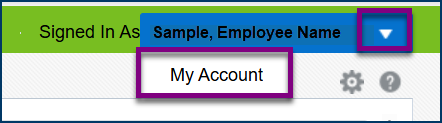 3. The My Account window displays. Select the Applications Roles tab.
 4. View your approved inquiry roles
5. To return, select either the OK or Cancel button.
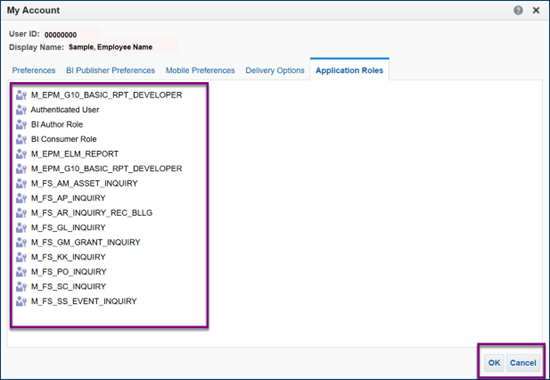 For more information about the inquiry roles required for SWIFT subject areas, view the Subject Areas for Financial and Supply Chain Management Quick Reference Guide.
|
|
|
For security purposes, SWIFT automatically logs users out of the system after 20 minutes of inactivity. SWIFT displays a warning message a couple of minutes prior to logging you out. If you are still working in SWIFT, select the OK button to continue your session.
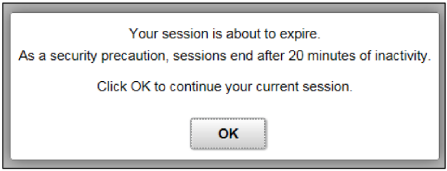 Some users frequently have multiple SWIFT pages open at the same time. Please, be aware that inactivity is measured on all open pages. You can be interacting with SWIFT on one open page, and the inactivity on another page can still boot you out of the system. Therefore, remember to close additional SWIFT pages after use.
If logged out of SWIFT due to inactivity, it is best practice to clear your browsing history and cache before starting a new session. Refer to the Clear Browsing History and Cache Reference Guide for instructions.
|
|
|
The SWIFT Training team offers SWIFT module training through a variety of methods at no additional cost to the agency. There are SWIFT training guides and training videos, webinars, eLearning, and individual sessions (by request through the SWIFT Help Desk).
Find current SWIFT training in Learning Management. Enter "SWIFT" in the Find Learning text entry box.
Module
|
SWIFT Webinars & eLearning
Sessions run 9:00 - 10:30 a.m., unless otherwise noted
|
Dates
|
|
Intro
|
Introduction to SWIFT Navigation webinar
|
4/8/26; 5/12/26; 6/17/26
|
|
Intro
|
Introduction to SWIFT Navigation eLearning
|
Anytime
|
|
Intro
|
Overview of SWIFT Reporting webinar
|
4/22/26; 5/20/26; 6/23/26
|
|
AP
|
SWIFT Vouchers and Accounts Payable, Overview Webinar
|
5/13/26
|
|
AR
|
SWIFT Accounts Receivable Part A: Direct Journal Deposits webinar
|
4/14/26
|
|
AR
|
SWIFT Accounts Receivable Part B: Apply Payments to Invoices webinar
|
4/15/26
|
|
AR
|
SWIFT Accounts Receivable Part C: Maintenance Worksheets webinar
|
4/16/26
|
|
BI
|
SWIFT Billing Part 1 webinar
|
5/6/26
|
|
BI
|
SWIFT Billing Part 2 webinar
|
5/7/26
|
|
KK
|
SWIFT Budget Journal Administration Part 1 webinar
|
6/10/26
|
|
KK
|
SWIFT Budget Journal Administration Part 2 webinar
|
6/11/26
|
|
SS
|
SWIFT Strategic Sourcing eLearning
|
Anytime
|
|
|
|
The SWIFT Training team offers EPM Data Warehouse training for SWIFT data through a variety of methods at no additional cost to the agency. There are EPM training guides, videos, labs, and individual sessions (by request through the SWIFT Help Desk).
Find current EPM Data Warehouse training in Learning Management. Enter "EPM" in the Find Learning text entry box.
EPM Data Warehouse Labs
Sessions run 9:00 - 10:30 a.m., unless otherwise noted
|
Dates
|
|
Introduction to the EPM Data Warehouse for SWIFT Data webinar
|
6/4/26
|
|
SWIFT EPM Create and Save an All Expenditures Report lab
|
4/23/26
|
|
SWIFT EPM Create and Save an All Receipts Report lab
|
5/14/26
|
|
SWIFT EPM Create and Save a Manager's Financial Report lab
|
5/13/26
|
|
SWIFT EPM Create and Save a New Analysis lab
|
5/21/26
|
|
SWIFT EPM Format Your Report lab
|
6/3/26
|
|
SWIFT EPM Using Standard Reports and Understanding the Data webinar
|
6/24/26
|
|
|
|
Maintenance Window: SWIFT is unavailable during the statewide systems maintenance window, every Sunday from 6:00 AM - 2:00 PM.
We want to hear from you! Email the SWIFT Training and Help Desk team using the button below to share your ideas or suggestions about improving user experiences with our systems, training opportunities, newsletter notifications, or system issues.
|
|
|
All current SWIFT users should receive the SWIFT Update for timely notifications of important deadlines, upcoming system upgrades, scheduled maintenance, and training opportunities. Let us know if someone on your team is not receiving important updates or news from us.
|
|
|
|