|
March 19, 2026
For users of SWIFT Accounting and Procurement modules and those who use SWIFT data in the EPM Data Warehouse.
Contents
|
|
|
Reporting suspicious activity is crucial to safeguarding state resources. By being vigilant and promptly reporting unusual behaviors, you can play a vital role in protecting our community.
What are signs of suspicious activity?
It is important to familiarize yourself with the signs of suspicious activity to ensure you can act effectively when necessary. These indicators can often signal potential fraud, waste, or abuse of public resources.
Here are common red flags to watch out for.
-
Unusual Transactions. Be aware of transactions that deviate from normal patterns, such as unusually large payments, frequent transfers to unknown accounts, or payments to unfamiliar vendors.
-
Unjustified Expenses. Be alert to expenses that seem excessive, unnecessary, or unsupported by proper documentation.
-
Unauthorized Access Attempts. Pay attention to people trying to gain access to restricted areas without proper identification or clearance.
-
Conflicts of Interest. Be mindful of situations where employees could have personal interests that could influence their responsibilities.
-
Falsified Records. Be alert to any discrepancies or inconsistencies in official records, such as missing documents, altered data, or forged signatures.
Reporting Mechanisms
You can help protect state resources by reporting instances of potential fraud, waste, and abuse of State resources. There are several ways to report suspicious activity. The State’s Whistleblower statute protects state agency workers who in good faith report actual, suspected, or planned violations.
|
Resource
|
Fraud Reporting Details
|
|
Agency -Specific
|
Each agency has their own designated reporting channels and mechanisms. It is important to familiarize yourself with your agency’s processes and feel confident in sharing this information with others at your agency. In some cases, hotlines or other anonymous channels exist, or employees can report concerns to supervisors, senior management, and human resources. Management must be ready to assist.
|
|
MMB Internal Controls
|
Fraud Reporting Resources for employee fraud, consumer fraud, and cyber fraud are available on MMB’s Internal Control & Accountability Fraud Reporting webpage.
|
|
MN Office of the Legislative Auditor (OLA)
|
The Office of Legislative Auditor’s website offers an online or printable allegation form to report possible misuse of state money and other public resources such as computers, equipment, telephones, or work time. They also receive allegations regarding noncompliance with state law.
|
|
Financial Crimes and Fraud Section at Bureau of Criminal Apprehension (BCA)
|
The Financial Crimes and Fraud Section provides several options for reporting suspected fraud: Email: MNfraud.Bureau@state.mn.us Phone: 651-793-3750 or Toll-free: 1-888-372-8366 Fax: 651-539-1551 Or by mail: Minnesota Bureau of Criminal Apprehension Financial Crimes and Fraud section 1430 Maryland Ave. E. St. Paul, MN 55106
|
You can contact the MMB Internal Control and Accountability Unit for more information on trainings, risk assessment development, control activities, monitoring ideas, and other key information.
|
|
|
Help Desk Hot Topics feature Frequently Asked Questions (FAQs) answered by the SWIFT Help Desk. Use these as a friendly reminder of a process or as an opportunity to learn something new!
Question: How do I review or update a Remit to address on a voucher in the Accounts Payable module?
Answer: Look on the Payments tab on a voucher. You can find the Remit to address in the Payment Information section.
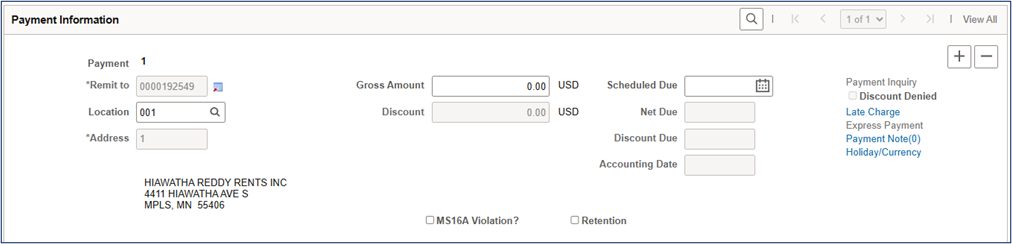 The Remit to address defaults based on the supplier’s Location Code selected when the voucher was created. You cannot edit the Remit to address field. You can update it by selecting an existing Location Code for that supplier with the address you wish to use. If that address is not attached to a Location Code, submit a Supplier Change Request to add or update the address tied to the location, see Edit Supplier's Address QRG for directions.
To review how to find the correct Location Code, view the Supplier Query - DBA Name and Location Code Quick Reference Guide.
Contact the MMB Vendor Supplier team for assistance with any supplier issues.
Did you know? You can look for a supplier with any one of a variety of fields. For example, you can search by full address, customer number, or withholding tax ID (Tax Identification Number). View the Review Supplier Inquiry Quick Reference Guide for more information.
|
|
|
SWIFT Staff Spotlight: Chris Finn
Get to know members of the SWIFT support teams who answer your calls, respond to your emails, and make sure you get the information you need. This SWIFT Staff Spotlight is on Chris Finn. Chris is a State Program Administrator Senior on the SWIFT Training & Help Desk team at Minnesota Management & Budget (MMB).
What are you enjoying in your job so far?
I sincerely appreciate the professionalism and flexibility of my team and fellow co-workers. The environment and atmosphere are absolutely stellar!
How long have you been with the State of Minnesota?
Only 6 weeks, but I have 10+ years of experience with government purchasing, first with the City and County of Eau Claire, WI, and then with the State of Wisconsin.
Fun Fact!
I run a theatre company with my husband, James, called Two Griffins Theatre. We produce 2 shows a season and our latest original work, Jekyll/Hyde, just won Best Play in February 2026:

|
|
|
The Minnesota Department of Revenue will be administering the following new sales and use taxes effective April 1, 2026:
Faribault County 0.5% Transit Sales and Use Tax
The Minnesota Department of Revenue will be ending the following sales and use taxes ending March 31, 2026:
Scanlon 0.5% Sales and Use Tax ends March 31, 2026
The sales and use tax rate changes apply to sales made on or after April 1, 2026. They will be in addition to all other taxes in effect. Local sales tax applies to retail sales made and taxable services provided within the local taxing area (county/city limits). The tax applies to the same items that are taxable under the Minnesota sales and use tax law.
Agencies entering purchase orders for the new fiscal year, prior to the January 1, 2026, tax effective date, will have the old rate calculated and will need to update their purchase orders.
Purchase orders entered in SWIFT on or after April 1, 2026, will calculate the new tax rates for each county/city. Existing purchase orders and/or their vouchers will need to be adjusted to pay the correct tax if delivery occurs after various dates. Please note that the dates will be different based on whether goods or construction materials are being delivered. Check the tax notice for the affected city for the correct dates.
For assistance in changing the sales tax on a PO, please consult the Update the Sales Tax Settings on an Existing Purchase Order Quick Reference Guide.
Impact of New Local Tax
Please see the Minnesota Department of Revenue tax notice for the appropriate city for guidance in handling purchase orders and payments during the transition period.
Impact on Accounts Payable: Vouchers entered in SWIFT on or after the tax effective date will calculate the new tax rates for each county/city if the Invoice Date is on or after the tax effective date. If the Invoice Date is before the tax effective date, SWIFT will exclude the new tax rates. Please review the tax calculation carefully prior to payment on all vouchers with Ship To locations within these jurisdictions.
Impact on Purchase Orders: SWIFT will be updated with the new tax codes for all existing Ship To addresses located in the affected cities. New purchase orders, created on or after April 1, 2026, will calculate the new rate of tax for the ship to addresses within those counties/cities. Existing purchase orders may or may not need to have the tax code updated on the PO if payment can be processed during any allowed grace period(s), again, see the general notice for each county/city. Previously any Ship To addresses in affected cities may have used the tax code of 0000, State Tax only.
To calculate the new combined rate, state and local tax rate, the tax code(s) on the purchase order must be updated to the new tax code(s) from the 0000 tax code. Because of the various transition rules, these codes will not be updated by SWIFT and must be updated by the purchase order buyer.
|
|
|
The SWIFT Training team offers SWIFT module training through a variety of methods at no additional cost to the agency. There are SWIFT training guides and training videos, webinars, eLearning, and individual sessions (by request through the SWIFT Help Desk).
Find current SWIFT training in Learning Management. Enter "SWIFT" in the Find Learning text entry box.
Module
|
SWIFT Webinars & eLearning
Sessions run 9:00 - 10:30 a.m., unless otherwise noted
|
Dates
|
|
Intro
|
Introduction to SWIFT Navigation webinar
|
4/8/26; 5/12/26; 6/17/26
|
|
Intro
|
Introduction to SWIFT Navigation eLearning
|
Anytime
|
|
Intro
|
Overview of SWIFT Reporting webinar
|
4/22/26; 5/20/26; 6/23/26
|
|
AR
|
SWIFT Accounts Receivable Part A: Direct Journal Deposits webinar
|
4/14/26
|
|
AR
|
SWIFT Accounts Receivable Part B: Apply Payments to Invoices webinar
|
4/15/26
|
|
AR
|
SWIFT Accounts Receivable Part C: Maintenance Worksheets webinar
|
4/16/26
|
|
BI
|
SWIFT Billing Part 1 webinar
|
5/6/26
|
|
BI
|
SWIFT Billing Part 2 webinar
|
5/7/26
|
|
KK
|
SWIFT Budget Journal Administration Part 1 webinar
|
6/10/26
|
|
KK
|
SWIFT Budget Journal Administration Part 2 webinar
|
6/11/26
|
|
SS
|
SWIFT Strategic Sourcing eLearning
|
Anytime
|
|
|
|
The SWIFT Training team offers EPM Data Warehouse training for SWIFT data through a variety of methods at no additional cost to the agency. There are EPM training guides, videos, labs, and individual sessions (by request through the SWIFT Help Desk).
Find current EPM Data Warehouse training in Learning Management. Enter "EPM" in the Find Learning text entry box.
EPM Data Warehouse Labs
Sessions run 9:00 - 10:30 a.m., unless otherwise noted
|
Dates
|
|
Introduction to the EPM Data Warehouse for SWIFT Data webinar
|
4/1/26; 6/4/26
|
|
SWIFT EPM Create and Save an All Expenditures Report lab
|
4/23/26
|
|
SWIFT EPM Create and Save an All Receipts Report lab
|
5/14/26
|
|
SWIFT EPM Create and Save a Manager's Financial Report lab
|
5/13/26
|
|
SWIFT EPM Create and Save a New Analysis lab
|
5/21/26
|
|
SWIFT EPM Format Your Report lab
|
3/25/26; 6/3/26
|
|
SWIFT EPM Using Standard Reports and Understanding the Data webinar
|
3/26/26; 6/24/26
|
|
|
|
Maintenance Window: SWIFT is unavailable during the statewide systems maintenance window, every Sunday from 6:00 AM - 2:00 PM.
We want to hear from you! Email the SWIFT Training and Help Desk team using the button below to share your ideas or suggestions about improving user experiences with our systems, training opportunities, newsletter notifications, or system issues.
|
|
|
All current SWIFT users should receive the SWIFT Update for timely notifications of important deadlines, upcoming system upgrades, scheduled maintenance, and training opportunities. Let us know if someone on your team is not receiving important updates or news from us.
|
|
|
|
|