|
January 15, 2026
For users of SWIFT Accounting and Procurement modules and those who use SWIFT data in the EPM Data Warehouse.
Contents
|
|
|
Last session the Legislature enacted Minn. Stat. Sec. 15.442 that establishes a new reporting requirement for most executive branch entities, except the Minnesota State Colleges and Universities system and the Minnesota Zoo. By February 1 of each year, from 2026 through 2031, agencies must publish the following information on their website for the previous fiscal year:
(1) the total advertising spending by the agency; and
(2) the total percentage of advertising spending in local news organizations, including a breakdown of the total percentage of advertising spending in local newspapers, radio, and television.
To help facilitate agencies’ tracking and reporting, Minnesota Management and Budget (MMB) created four new expense account codes for advertising with local organizations. The existing three advertising expense account codes remain available. Use of these account codes is optional.
Available advertising-related account codes:
- 411104 Advertising
- 411106 Advertising – Local Newspaper (New)
- 411107 Advertising – Local Radio (New)
- 411108 Advertising – Local Television (New)
- 411109 Advertising – Other Local News Organization (New)
- 411303 Advertising – Marketing – Comm
- 411353 Advertising – Marketing-Comm<25K
Additionally, agencies may wish to access account data related to the use of the advertising series of account codes in either SWIFT or the EPM Data Warehouse.
In SWIFT, you can run the SWIFT query “M_AP_GBL_ADVERTISING_CODES.” This query should be scheduled to run successfully. Refer to the Schedule Queries Quick Reference Guide for instructions.
In the EPM Data Warehouse, you can run an All Expenditures report that filters on these account codes. The All Expenditures dashboard is located in the _Statewide folder. Refer to the All Expenditures Report Quick Reference Guide for instructions.
Questions? Contact the SWIFT Help Desk by email or phone at 651-201-8100, option 2.
|
|
|
The EPM Data Warehouse Reporting and staging views will be unavailable starting Friday, February 13, 2026, at 7 p.m. until Monday, February 16, 2026, at 7 p.m. Please plan around this time to minimize interruption of critical business functions. We apologize for the inconvenience.
If you have questions or concerns, please email the SWIFT Help Desk.
Thank you,
MMB Systems Team
|
|
|
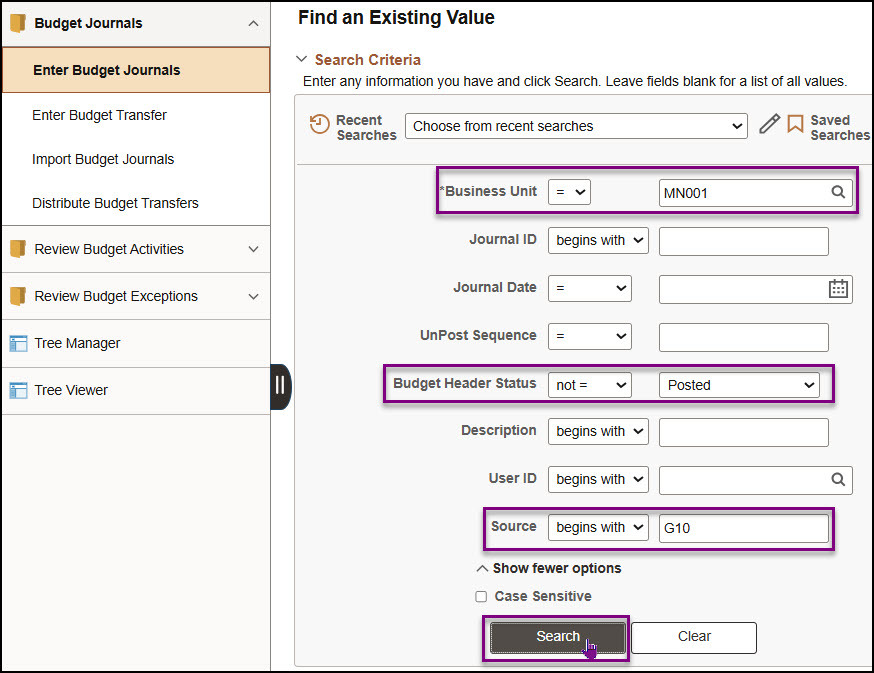
While entering budget journals in the Commitment Control module, you may be called away or your session may time out. The Enter Budget Journal page can be used to search for budget journals that are not fully processed. You should perform this search on a routine basis to ensure that there are no budget journals waiting to be processed.
1. Enter MN001 in the Business Unit field. MN001 is the only business used in the Commitment Control module.
2. To search for unfinished journals, change the operator to "not =" in the Budget Header Status field.
3. Select “Posted” from the drop-down menu.
4. In the Source field, enter your 3-digit agency code (also the first 3 characters of your business unit).
5. Select the Search button.
6. If more than one result is returned, select an entry in the Search Results section.
7. The Budget Header page for the budget journal displays. Determine the next processing step and process as you would normally. Refer to the Enter Expense Budget Journals or Enter Revenue Budget Journals guides for the detailed instructions.
Note: If you wish to delete the journal, select the “Delete Journal” option in the Process field on the Budget Lines tab.
|
|
Consider taking our training webinars and check out our other training materials!
The SWIFT training team offers a wide range of webinars and labs related to SWIFT transactions and SWIFT data in the EPM Data Warehouse. Find and register for them in Learning Management, ELM. Enter “SWIFT” in the Find Learning text box. There is no cost to your agency.
- 26 different webinars and labs on wide variety of topics. Get started with:
-
Introduction to SWIFT Navigation. This webinar introduces you to the Statewide Integrated Financial Tools (SWIFT) system. If you are new, take this webinar before taking other SWIFT webinars.
-
Overview of SWIFT Reporting. This webinar provides an overview how to get information from SWIFT. We cover inquiries, queries, reports, and the various support tools.
-
Introduction to the EPM Data Warehouse for SWIFT. This webinar introduces you to the Enterprise Performance Management (EPM) Data Warehouse, a reporting platform for the State of Minnesota. We cover key concepts, basic navigation, and shared SWIFT reports and data. This webinar is highly recommended before taking other EPM Data Warehouse for SWIFT webinars or labs.
- SWIFT Quick Reference Guides
- SWIFT Training Videos
- EPM Warehouse Training Quick Reference Guides
Psst. Many users suggest taking our webinars more than once.
If you have any questions or suggestions regarding training, contact the SWIFT Help Desk Email: swifthelpdesk.mmb@state.mn.us Phone: 651-201-8100, option 2.
|
|
|
The SWIFT Training team offers SWIFT module training through a variety of methods at no additional cost to the agency. There are SWIFT training guides and training videos, webinars, eLearning, and individual sessions (by request through the SWIFT Help Desk).
Find current SWIFT training in Learning Management. Enter "SWIFT" in the Find Learning text entry box.
Module
|
SWIFT Webinars & eLearning
Sessions run 9:00 - 10:30 a.m., unless otherwise noted
|
Dates
|
|
Intro
|
Introduction to SWIFT Navigation webinar
|
2/4/26
|
|
Intro
|
Introduction to SWIFT Navigation eLearning
|
Anytime
|
|
Intro
|
Overview of SWIFT Reporting
|
1/21/26; 2/18/26
|
|
AR
|
SWIFT Accounts Receivable Part A: Direct Journal Deposits
|
1/27/26
|
|
AR
|
SWIFT Accounts Receivable Part B: Apply Payments to Invoices
|
1/28/26
|
|
AR
|
SWIFT Accounts Receivable Part C: Maintenance Worksheets
|
1/29/26
|
|
BI
|
SWIFT Billing Part 1 webinar
|
2/11/26
|
|
BI
|
SWIFT Billing Part 2 webinar
|
2/12/26
|
|
KK
|
SWIFT Budget Journal Administration Part 1
|
3/11/26
|
|
KK
|
SWIFT Budget Journal Administration Part 2
|
3/12/26
|
|
SS
|
SWIFT Strategic Sourcing eLearning
|
Anytime
|
|
|
|
The SWIFT Training team offers EPM Data Warehouse training for SWIFT data through a variety of methods at no additional cost to the agency. There are EPM training guides, videos, labs, and individual sessions (by request through the SWIFT Help Desk).
Find current EPM Data Warehouse training in Learning Management. Enter "EPM" in the Find Learning text entry box.
EPM Data Warehouse Labs
Sessions run 9:00 - 10:30 a.m., unless otherwise noted
|
Dates
|
|
Introduction to the EPM Data Warehouse for SWIFT Data
|
2/5/26
|
|
SWIFT EPM Create and Save an All Expenditures Report
|
1/22/26
|
|
SWIFT EPM Create and Save a New Analysis
|
2/19/26
|
|
|
|
Maintenance Window: SWIFT is unavailable during the statewide systems maintenance window, every Sunday from 6:00 AM - 2:00 PM.
We want to hear from you! Email the SWIFT Training and Help Desk team using the button below to share your ideas or suggestions about improving user experiences with our systems, training opportunities, newsletter notifications, or system issues.
|
|
|
All current SWIFT users should receive the SWIFT Update for timely notifications of important deadlines, upcoming system upgrades, scheduled maintenance, and training opportunities. Let us know if someone on your team is not receiving important updates or news from us.
|
|
|
|
|