|
January 8, 2026
For users of SWIFT Accounting and Procurement modules and those who use SWIFT data in the EPM Data Warehouse.
Contents
|
|
|
The EPM Data Warehouse Reporting and staging views will be unavailable starting Friday, February 13, 2026, at 7 p.m. until Monday, February 16, 2026, at 7 p.m. Please plan around this time to minimize interruption of critical business functions. We apologize for the inconvenience.
If you have questions or concerns, please email the SWIFT Help Desk.
Thank you,
MMB Systems Team
|
|
|
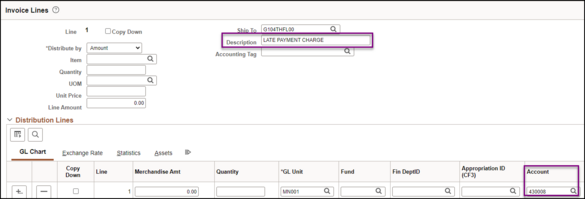
US Bank charges late fees on past due purchasing card (PCard) accounts. Agencies are invoiced in the amount of up to one percent (1%) per month on the amount overdue, or a minimum of $2. Late fees are included on your monthly statement from US Bank and available to view in SWIFT. However, the Late Payment transaction cannot be reconciled the same way other transactions are reconciled.
To pay a late fee associated with a PCard statement, agencies must manually add this fee to their monthly PCard voucher by adding a line and entering the information. Make sure to enter Late Payment Charge in the Description field. In the Account field use Expense code 430008 (Interest Pd To Vend Late Pymt). After the line has been added, provide the voucher number to SWIFT Help Desk to have the transaction removed from the PCard pages.
 As a reminder, pay PCard statements on time to avoid potential late fees, take advantage of available rebates, and avoid potential violations of Minn. Stat. § 16A. Purchasing Policy 1b requires that Purchasing Card Coordinators use Access Online to review statements and monitor account activity.
- If you have questions regarding PCards, please contact the SWIFT Help Desk.
- For questions regarding the state contract or Purchasing Card Use Policy 1b, please contact Robbyn Overall.
|
|
|
Need Help? We encourage you to refer to our many SWIFT Training materials including Quick Reference Guides (QRGs) and Training Videos. The SWIFT Training team is actively updating and creating new materials for SWIFT users.
We also understand that live help is often the most useful and immediate route to a solution. The SWIFT Help Desk responds to many questions, issues, and requests to help you get your work done in SWIFT. Whether you are experiencing a technical issue or need guidance on a SWIFT transaction, the SWIFT Help Desk is your main point of contact. Please do not contact SWIFT module leads or trainers directly. The SWIFT Help Desk ensures your matter is forwarded and escalated as needed. In addition, the SWIFT Help Desk documents each interaction, helping us identify larger system issues as well as identifying training and communication gaps.
You can contact the SWIFT Help Desk at:
Email: SWIFTHelpDesk.MMB@state.mn.us Phone: 651-201-8100, option 2 Hours: 7:30 a.m. to 4:00 p.m., Monday through Friday (closed holidays).
|
|
|
Do you find yourself remembering a topic from the SWIFT Update and wonder how to easily find past newsletters? SWIFT Updates are posted on MMB’s website. You can find the current SWIFT Update as well as Previous Updates for the past 5 years.
|
|
|
The SWIFT Training team offers SWIFT module training through a variety of methods at no additional cost to the agency. There are SWIFT training guides and training videos, webinars, eLearning, and individual sessions (by request through the SWIFT Help Desk).
Find current SWIFT training in Learning Management. Enter "SWIFT" in the Find Learning text entry box.
Module
|
SWIFT Webinars & eLearning
Sessions run 9:00 - 10:30 a.m., unless otherwise noted
|
Dates
|
|
Intro
|
Introduction to SWIFT Navigation webinar
|
2/4/26
|
|
Intro
|
Introduction to SWIFT Navigation eLearning
|
Anytime
|
|
Intro
|
Overview of SWIFT Reporting
|
1/21/26; 2/18/26
|
|
AR
|
SWIFT Accounts Receivable Part A: Direct Journal Deposits
|
1/27/26
|
|
AR
|
SWIFT Accounts Receivable Part B: Apply Payments to Invoices
|
1/28/26
|
|
AR
|
SWIFT Accounts Receivable Part C: Maintenance Worksheets
|
1/29/26
|
|
BI
|
SWIFT Billing Part 1 webinar
|
2/11/26
|
|
BI
|
SWIFT Billing Part 2 webinar
|
2/12/26
|
|
KK
|
SWIFT Budget Journal Administration Part 1
|
3/11/26
|
|
KK
|
SWIFT Budget Journal Administration Part 2
|
3/12/26
|
|
SS
|
SWIFT Strategic Sourcing eLearning
|
Anytime
|
|
|
|
The SWIFT Training team offers EPM Data Warehouse training for SWIFT data through a variety of methods at no additional cost to the agency. There are EPM training guides, videos, labs, and individual sessions (by request through the SWIFT Help Desk).
Find current EPM Data Warehouse training in Learning Management. Enter "EPM" in the Find Learning text entry box.
EPM Data Warehouse Labs
Sessions run 9:00 - 10:30 a.m., unless otherwise noted
|
Dates
|
|
Introduction to the EPM Data Warehouse for SWIFT Data
|
2/5/26
|
|
SWIFT EPM Create and Save an All Expenditures Report
|
1/22/26
|
|
SWIFT EPM Create and Save a New Analysis
|
2/19/26
|
|
SWIFT EPM Using Standard Reports and Understanding the Data
|
1/15/26
|
|
|
|
Maintenance Window: SWIFT is unavailable during the statewide systems maintenance window, every Sunday from 6:00 AM - 2:00 PM.
We want to hear from you! Email the SWIFT Training and Help Desk team using the button below to share your ideas or suggestions about improving user experiences with our systems, training opportunities, newsletter notifications, or system issues.
|
|
|
All current SWIFT users should receive the SWIFT Update for timely notifications of important deadlines, upcoming system upgrades, scheduled maintenance, and training opportunities. Let us know if someone on your team is not receiving important updates or news from us.
|
|
|
|