|
Oct. 16, 2025
For users of SWIFT Accounting and Procurement modules and those who use SWIFT data in the EPM Data Warehouse.
Contents
|
|
|
Minnesota Management and Budget (MMB) is hiring a Training and Development Specialist 3 to provide training for SWIFT (Statewide Integrated Financial Tools). As a SWIFT trainer, the individual is responsible for ensuring that quality training materials are created, maintained, and delivered in support of agency users of the SWIFT application. Training delivery can take a variety of forms, such as instructor-led classrooms, online training, webinars, videos, eLearning, or participation in workshops. SWIFT Trainers work closely with agency staff and other business units. SWIFT Trainers also provide support for SWIFT Help Desk calls and emails and backup SWIFT Help Desk staff.
This position may have the flexibility to telecommute, work a hybrid schedule, or work in the office. The incumbent may be expected to work in the office on occasion.
Working for the State of Minnesota means a great work-life balance, affordable benefits, and many great opportunities for advancement in 100 State agencies. The Job ID is #89515.
|
|
|
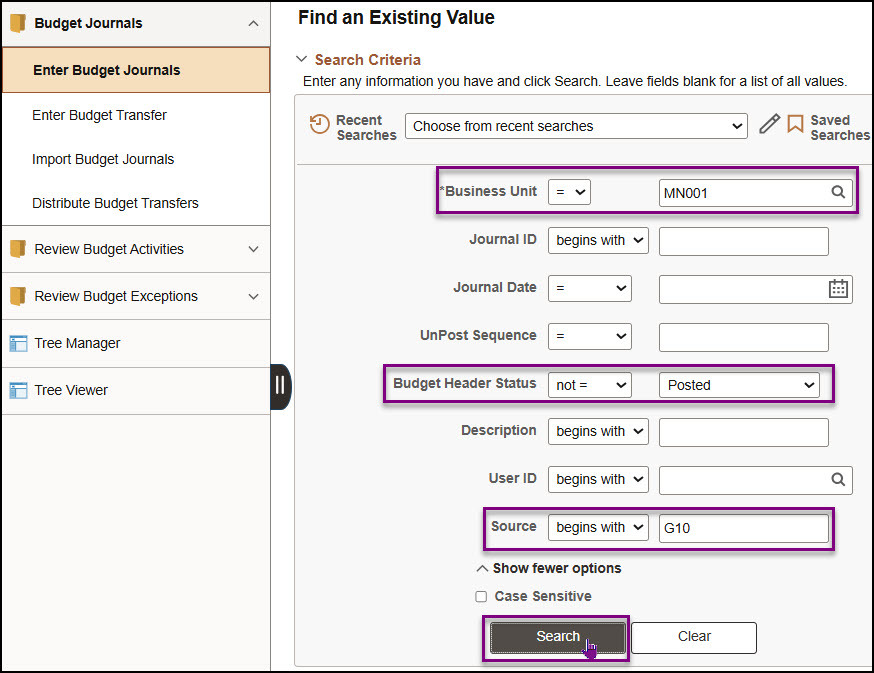
While entering budget journals in the Commitment Control module, you may be called away or your session may time out. The Enter Budget Journal page can be used to search for budget journals that are not fully processed. You should perform this search on a routine basis to ensure that there are no budget journals waiting to be processed.
1. Enter MN001 in the Business Unit field. MN001 is the only business used in the Commitment Control module.
2. To search for unfinished journals, change the operator to "not =" in the Budget Header Status field.
3. Select “Posted” from the drop-down menu.
4. In the Source field, enter your 3-digit agency code (also the first 3 characters of your business unit).
5. Select the Search button.
 6. If more than one result is returned, select an entry in the Search Results section.
7. The Budget Header page for the budget journal displays. Determine the next processing step and process as you would normally. Refer to the Enter Expense Budget Journals or Enter Revenue Budget Journals guides for the detailed instructions.
Note: If you wish to delete the journal, select the “Delete Journal” option in the Process field on the Budget Lines tab.
|
|
|
The Office of State Procurement (OSP) recommends that agencies regularly review their events in SWIFT’s Strategic Sourcing module. Make sure that your agency reviews events that are not in a status of Awarded, Cancelled, or Not Awarded on a regular basis. Events in any other status need to be updated to a Valid status. In the Event Workbench, search by Event Status. You can also set the Default Search Options to assist you to find events to review and possibly update.
The Strategic Sourcing Quick Reference Guides and videos provide information on ways to update an event such as the following topics.
- Cancel an Event
- Close Lines
- Create a New Round
- Create a New Version
- Edit an Event
View the Strategic Sourcing Quick Reference Guides.
View the Strategic Sourcing videos.
Please contact the SWIFT Help Desk if you have questions about reviewing and updating events in SWIFT’s Strategic Sourcing module.
|
|
Module
|
SWIFT Webinars & eLearning
Sessions run 9 a.m. - 10:30 a.m., unless otherwise noted
|
DATES
|
|
Intro
|
Introduction to SWIFT Navigation webinar
|
11/12/25; 12/9/25
|
|
Intro
|
Introduction to SWIFT Navigation eLearning
|
Anytime
|
|
Intro
|
Overview of SWIFT Reporting
|
11/13/25; 12/11/25
|
|
AR
|
SWIFT Accounts Receivable Part A: Direct Journal Deposits webinar
|
10/28/25; 12/11/25
|
|
AR
|
SWIFT Accounts Receivable Part B: Apply Payments to Invoices webinar
|
10/29/25
|
|
AR
|
SWIFT Accounts Receivable Part C: Maintenance Worksheets webinar
|
10/30/25
|
|
SS
|
SWIFT Strategic Sourcing eLearning
|
Anytime
|
|
|
Module
|
EPM Data Warehouse Labs for SWIFT Data
Sessions run 9 a.m. - 10:30 a.m., unless otherwise noted
|
DATES
|
|
EPM
|
Introduction to the EPM Data Warehouse for SWIFT webinar
|
12/3/25
|
|
EPM
|
SWIFT EPM Create and Save the Managers Financial Report lab
|
10/23/25
|
|
|
|
Maintenance Window: SWIFT is unavailable during the statewide systems maintenance window, every Sunday from 6:00 AM - 2:00 PM.
We want to hear from you! Email the SWIFT Training and Help Desk team using the button below to share your ideas or suggestions about improving user experiences with our systems, training opportunities, newsletter notifications, or system issues.
All current SWIFT users should receive the SWIFT Update for timely notifications of important deadlines, upcoming system upgrades, scheduled maintenance, and training opportunities. Let us know if someone on your team is not receiving important updates or news from us.
|
|
|
|