|
Oct. 2, 2025
For users of SWIFT Accounting and Procurement modules and those who use SWIFT data in the EPM Data Warehouse.
Contents
|
|
|
Customers are entities that purchase goods and services from State agencies. Customers can be updated or created in either the Accounts Receivable or Billing modules. In general, agencies maintain their customer records by SetID, usually the same as the Business Unit.
When adding or updating a customer record, do not accept the default of “Share” in the SetID. Enter the SetID for the business unit that is responsible for billing. Customers not set up with the correct SetID require intervention by the SWIFT Help Desk.
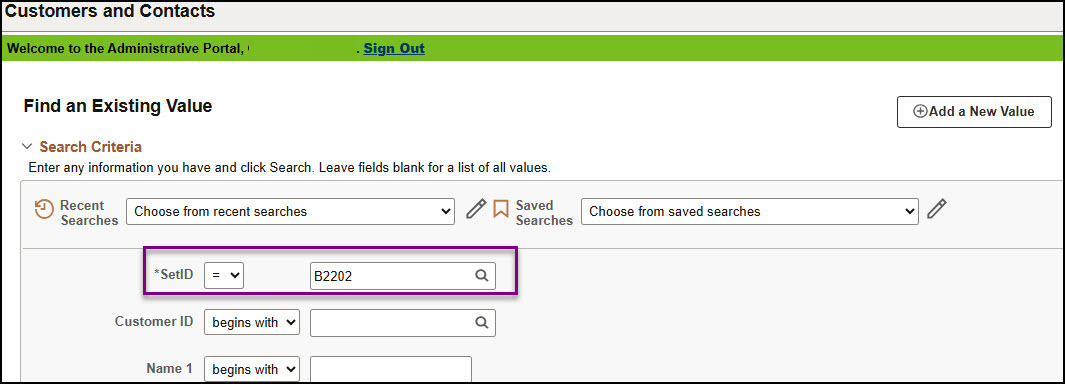 Note: Interagency customers are set up by SWIFT Module Support. When invoicing a state agency customer (interagency), remember to always use the Customer ID assigned to that agency rather than creating your own customer.
|
|
|
Q. Why does my interagency voucher say “Hold” on the Netting field? Should I change this?
A. On the Payments tab, SWIFT automatically sets the Netting field to “Hold” for interagency vouchers. The “Hold” must be on the Netting field of interagency vouchers because it allows the bilateral netting process to identify and process the interagency payment. Do not change this field. Once the payment is completed, SWIFT updates the Netting field to “Selected.”
For troubleshooting any issues with bilateral netting, view the Troubleshoot Interagency Vouchers Quick Reference Guide.
|
|
|
As part of the deposit process in the Accounts Receivable module in SWIFT, it is important to look for incomplete deposits on a regular basis.
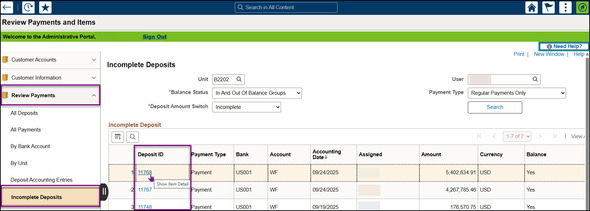
1. To check for incomplete deposits, both Direct Journal and Regular Item deposits, navigate to the Review Payments and Items tile. Navigation: Accounting, Accounts Receivable, Review Payments and Items, Incomplete Deposits.
2. Expand the Review Payments folder and select Incomplete Deposits.
3. Select the Search button.
4. A list of any incomplete deposits will display. Select on of the Deposit ID hyperlinks for more information.
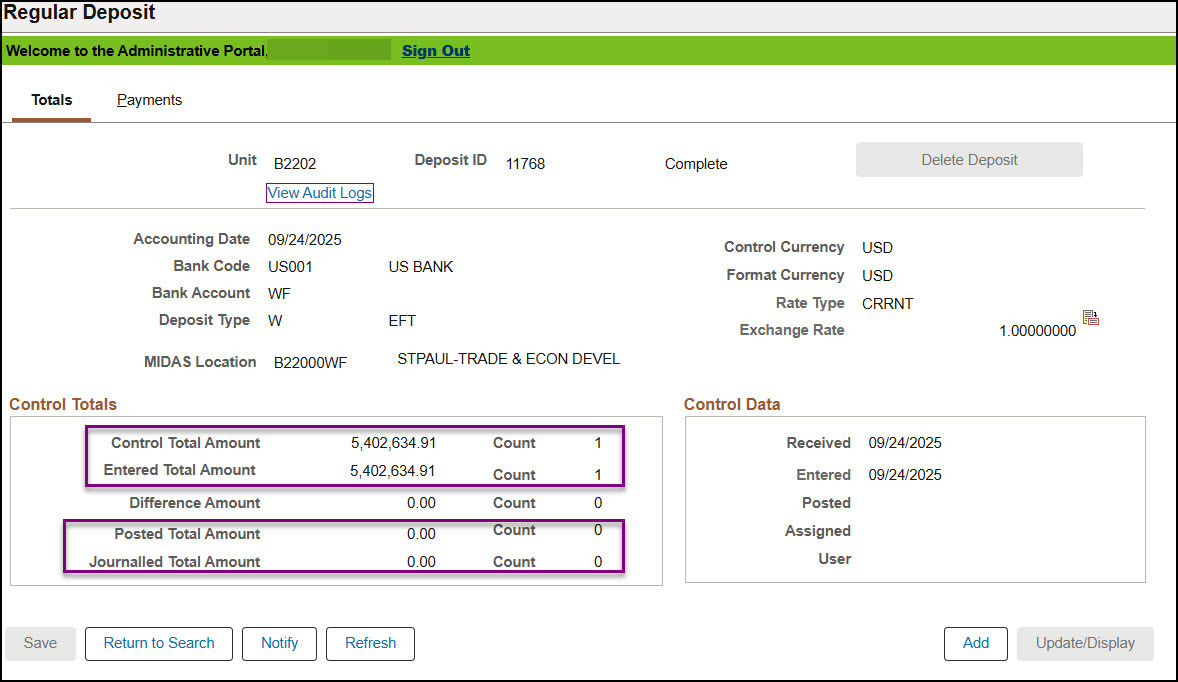
 5. The Totals page will display. In the Control Totals section, verify that the Posted Total Amount and/or the Journalled Total Amount equal the Control Total Amount and Entered Total Amount.
6. If they do not, complete the deposit by either applying payments for a regular item deposit or entering accounting entries for a direct journal deposit.
 For more detailed information, refer to the Verify Deposits are Complete Quick Reference Guide.
|
|
Module
|
SWIFT Webinars & eLearning
Sessions run 9 a.m. - 10:30 a.m., unless otherwise noted
|
DATES
|
|
Intro
|
Introduction to SWIFT Navigation webinar
|
10/14/25
|
|
Intro
|
Introduction to SWIFT Navigation eLearning
|
Anytime
|
|
Intro
|
Overview of SWIFT Reporting
|
10/9/25; 11/13/25
|
|
AP
|
SWIFT Create Vouchers webinar
|
10/16/25
|
|
AR
|
SWIFT Accounts Receivable Part A: Direct Journal Deposits webinar
|
10/28/25
|
|
AR
|
SWIFT Accounts Receivable Part B: Apply Payments to Invoices webinar
|
10/29/25
|
|
AR
|
SWIFT Accounts Receivable Part C: Maintenance Worksheets webinar
|
10/30/25
|
|
SS
|
SWIFT Strategic Sourcing eLearning
|
Anytime
|
|
SS
|
SWIFT Create, Post Approve Events webinar
Note: Completion of the Introduction to SWIFT Navigation is required.
|
10/9/25
|
|
SS
|
SWIFT Strategic Sourcing Part 2: Analyze, Award Events webinar
Note: Completion of the Introduction to SWIFT Navigation is required.
Time is 1:00 to 2:30 P.M.
|
10/9/25
|
|
|
Module
|
EPM Data Warehouse Labs for SWIFT Data
Sessions run 9 a.m. - 10:30 a.m., unless otherwise noted
|
DATES
|
|
EPM
|
Introduction to the EPM Data Warehouse for SWIFT webinar
|
10/7/25
|
|
EPM
|
SWIFT EPM Create and Save the Manager's Financial Report lab
|
10/23/25
|
|
|
|
Maintenance Window: SWIFT is unavailable during the statewide systems maintenance window, every Sunday from 6:00 AM - 2:00 PM.
We want to hear from you! Email the SWIFT Training and Help Desk team using the button below to share your ideas or suggestions about improving user experiences with our systems, training opportunities, newsletter notifications, or system issues.
All current SWIFT users should receive the SWIFT Update for timely notifications of important deadlines, upcoming system upgrades, scheduled maintenance, and training opportunities. Let us know if someone on your team is not receiving important updates or news from us.
|
|
|
|