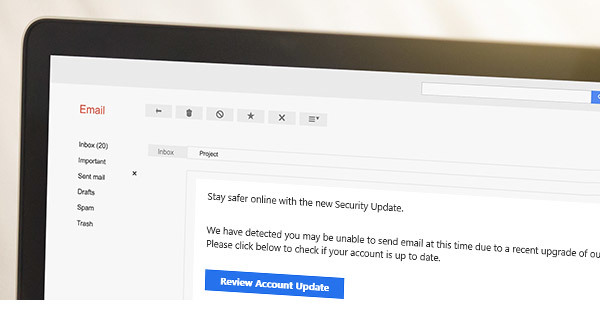
During this pandemic, it's more important than ever to vigilantly spot and avoid phishing emails, in your personal and professional life as a state employee.
Current phishing scams look more realistic, and are more sophisticated, than what has been seen before.
Cyber criminals are taking advantage of the sense of urgency, uncertainty, and awareness of the COVID-19 coronavirus. In January, security professionals reported an exponential increase in the number of phishing scams with malicious links and PDFs claiming to contain information on how to protect yourself from the spread of the disease in the United States.
Is this impacting state of Minnesota employees?
While we have not seen a direct impact to state employees yet, it is only a matter of time. Our protective tools are much more capable of detecting and blocking threats as new ones surface.
Reporting suspicious messages, sites, and events will help us detect and respond to the evolving cyber threats quickly.
COVID-19-related phishing examples
Some of the phishing attacks we've seen include:
- A fake COVID-19 tracking map that was distributing malware,
- COVID-19 smartphone apps distributing malware,
- Scam websites, and
- Impersonations of the Centers for Disease Control and the World Health Organization.
We've included a few examples below to help you spot these kinds of phishing attacks.
World Health Organization Impersonators
The World Health Organization (WHO) has reported that many cyber criminals are sending phishing emails while impersonating the organization in an effort to steal money or sensitive information.
The WHO will never ask you for login information, send email attachments you didn’t as for, ask you to visit a link outside of www.who.int, charge you money to apply for a job, conduct lotteries, or ask you to donate directly to emergency response plans or funding appeals.
Centers for Disease Control Imposters
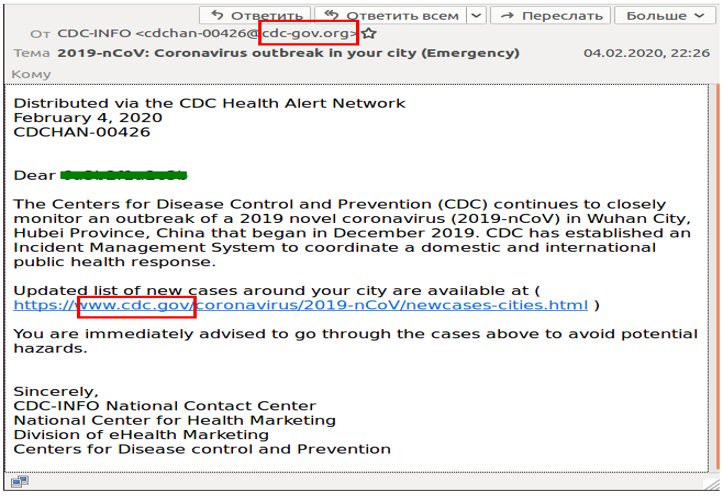
Since February, a phishing campaign from bad actors posing as the CDC has been reported nationwide. The emails are from the fake address “cdc-gov.org”, a look-alike domain that impersonates the legitimate domain "cdc.gov," as shown in the example below. The emails claim that the CDC has “established a management system to coordinate a domestic and international public health response” and they urge recipients to open a page that allegedly contains information about new cases of infection around their city.
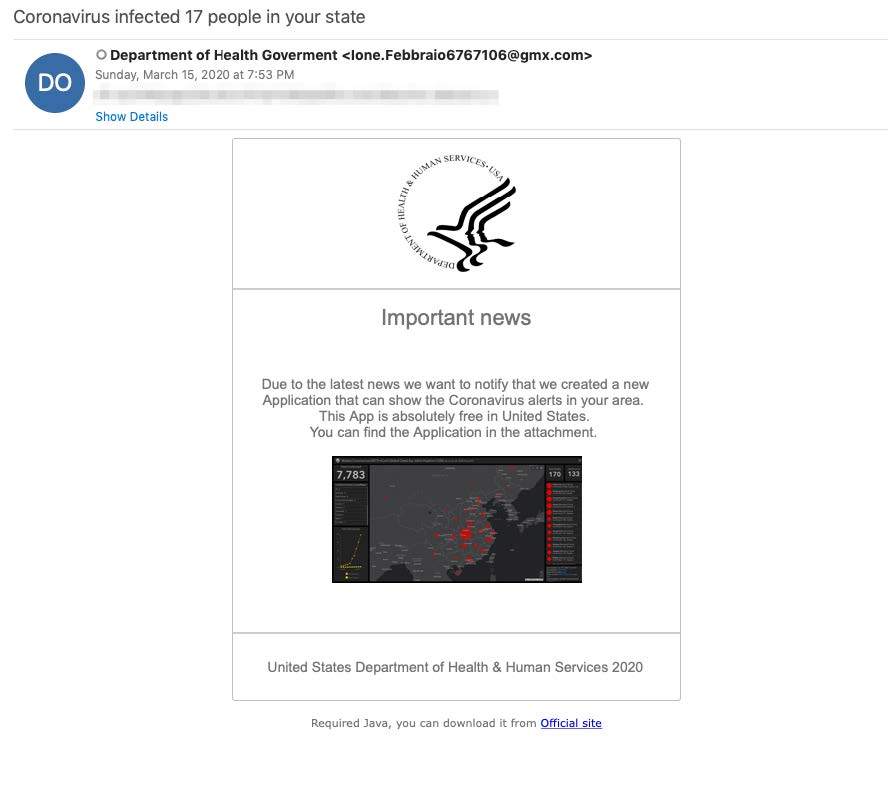
 The example below is a phishing email from a fake Department of Health Government organization. You can see that the email address is not a valid government email address, which is a good clue that this is a phishing attempt.
 Malicious COVID-19 Maps
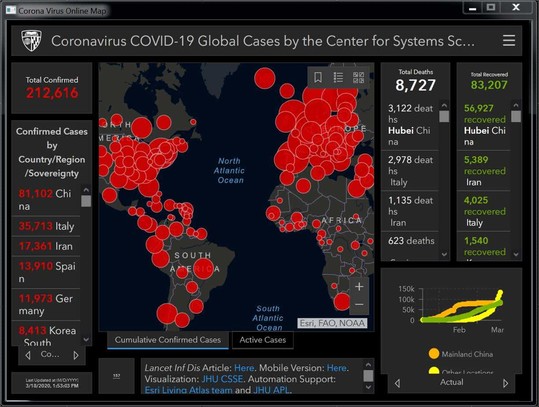
A malicious website pretending to be the live map for COVID-19 global cases by Johns Hopkins University infects users with an information-stealing program which can exfiltrate a variety of sensitive data. Anyone searching the internet for a COVID-19 map could unwittingly navigate to this malicious site.
The malicious site is hosted on “corona-virus-map[dot]com.” For state-owned computers and systems, this has been blocked by the Security Operations Center (SOC) to prevent navigation. Be careful when seeking any information on the web, and ensure you are using a verified source.
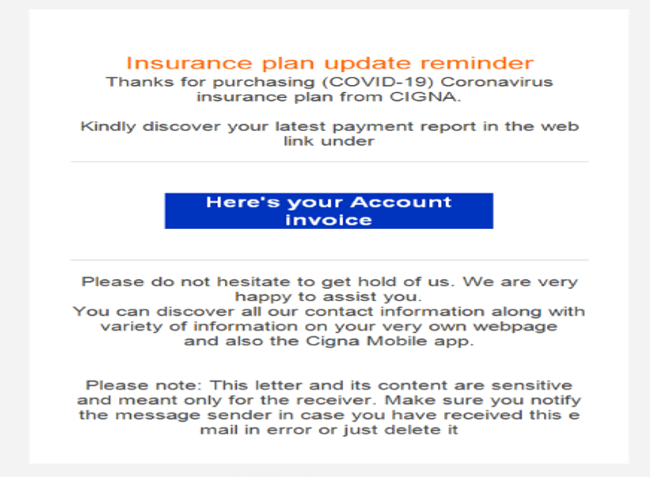
 Below is an example of a phishing scam targeting customers of an insurance company.
Other Examples of Phishing Emails
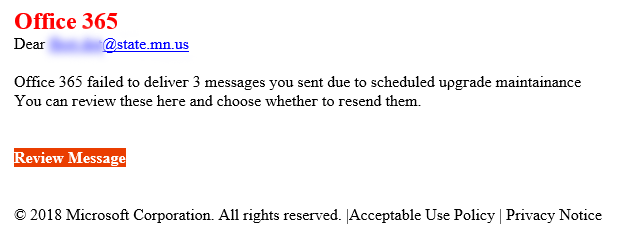
Below is a phishing email from an attack that happened to state employees this year. It pretends to be from Microsoft and claims that 3 messages failed to send due to scheduled maintenance. It prompts the recipient to click on a malicious link to review the unsent messages.
 Don't fall victim to phishing
Follow three easy steps to avoid falling victim to phishing emails:
- Hover over the sender email address to look past the sender display name and carefully read where the email was actually sent from.
- Do not click on any links in unsolicited or unexpected messages. You can hover over any link to also look past its display name to get a sense of where the link will actually take you.
- If it looks suspect, it probably is.
What should I do when I find a suspicious message in my inbox at work?
Don’t click on the links, and don’t open the attachments. Instead, report it ASAP!
- Highlight the suspicious message in your Outlook inbox pane.
- Select Ctrl + Alt + F to forward the email as an attachment (this is very important).
- Enter spam.reporting@state.mn.us in the “to” field.
- Type a short message and send.
What should I do if I clicked on a suspicious link or opened a suspicious attachment?
Self-reporting won't result in discipline, but could prevent a costly and damaging breach.
- Call the MNIT Service Desk at 651-297-1111. It’s the fastest way to get help, 24/7.
- Tell them you have a security incident: what happened, when, and how you discovered it.
- Tell your manager or supervisor so they are aware of the situation.
|