|
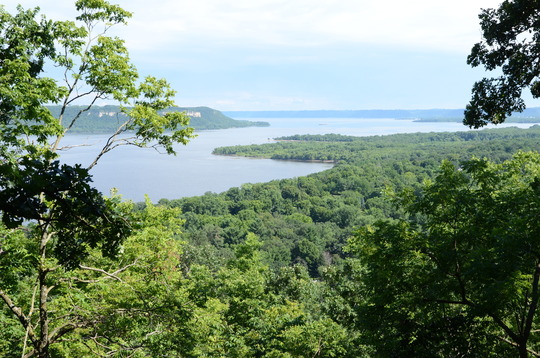
Photo taken from a bluff in Frontenac State Park overlooking Lake Pepin
May, 2026
In this issue...
Over the 15+ years of the Watershed Health Assessment Framework as a project, many tools, datasets and resources have been created. And, as the project has grown and added new facets, it becomes important to give our users a starting point to understand what we provide. This fall, we took the opportunity to redesign our web presence on the DNR website, to better serve as that jumping off point.
We approached the redesign from the perspective of a new user who lands on our page and asks, “What do they have to offer me?” That drove us to separate content spread across our WHAF webpages into clear categories on the main page: “The framework,” “Our applications,” “Our Products,” and “Additional resources,” as well as the “Stay Connected” options at the bottom of the page. These sections and their content were determined through the UX Card Sorting method, one of the ways we incorporated human-centered design into the process.
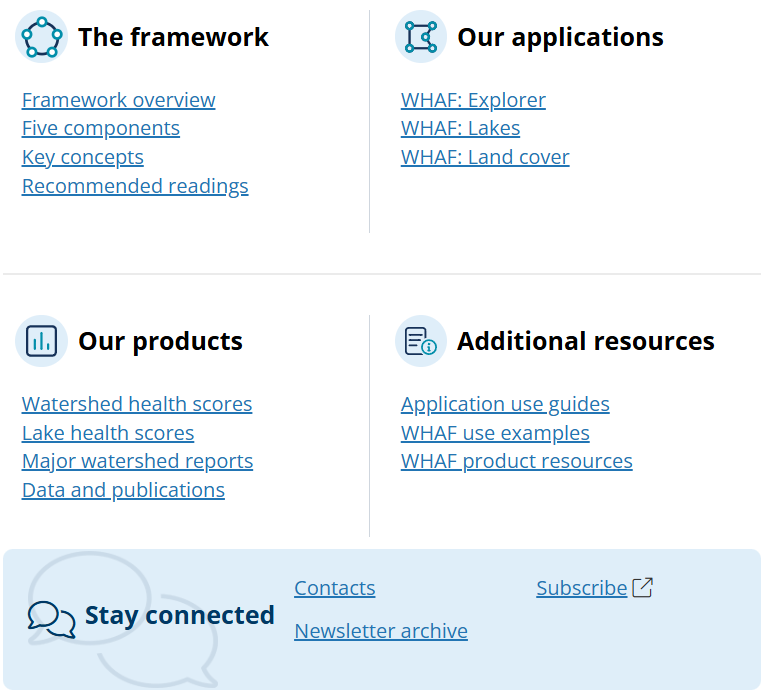 Categories used to organize the WHAF web presence
“The framework” holds pages about the key factors that are central to how the WHAF leverages data to understand watersheds as interconnected natural systems and considerations for managing them into the future. These pages describe concepts that are woven throughout the fabric of the applications we build and the analyses we produce.
“Our applications” lists the three applications we deliver to help users understand the current conditions and stressors affecting our watersheds, rivers and lakes.
“Our products” includes information about the additional datasets and reports we create to add value to or supplement our applications. Here you can find detailed explanations about the creation and use of the watershed and lake health scores. You can also view the reports we have generated as well as resources to download data we produce.
And “Additional resources” includes everything else you might need to interpret data, get help on how to navigate our applications, or find ways to put the WHAF to use in your own work. Also included here are links, metadata and citations for the data or publications we reference within our applications or products.
As always, we are here to have conversations about how to use the many facets of the WHAF or to hear your needs for better understanding Minnesota’s precious water resources. Feel free to contact us at WHAF.DNR@state.mn.us.
A survey was sent out last fall to better understand user experience with our flagship WHAF Explorer application and to gather ideas for how it might better serve users in the future. We have already been putting feedback from it to use in our work, but we want to share some of the things we heard from survey takers. Keep reading for some key takeaways and anonymous results from questions. We greatly appreciated your feedback, and it will continue to be valuable as we move forward.
-
Training materials: Some users requested training materials or videos to better understand how to use WHAF Explorer. Fortunately, we already have videos and written instructional guides to navigate WHAF Explorer and our other two applications (WHAF Lakes and WHAF Land Cover) available on our DNR webpage. Specifically for WHAF Explorer, visit our Map Tools guide and view a recording of a training we gave a few years back.
-
Data updates: Several users expressed that the application would be more useful to them if certain health scores and watershed data were updated more frequently. Some users also expressed interest in more data available to show changes over time, extending beyond what we already deliver for land cover and water withdrawal (supported by WHAF Land Cover). This is one of our team’s areas of highest priority. The analyses we produce involve multiple processing steps and the number of products we maintain has expanded. We are actively working on automating our workflows where possible and reallocating staff time to improve delivery speed. Future newsletters will highlight progress in these areas.
-
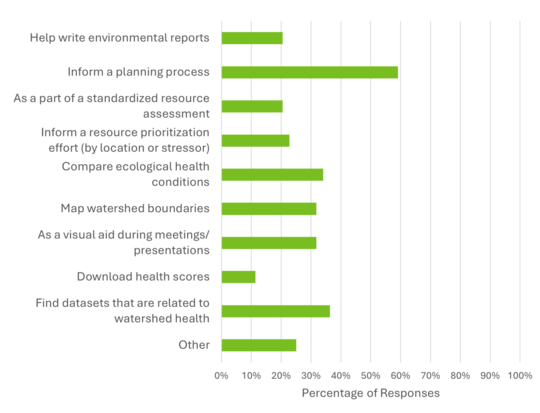
Use cases: Responses affirmed our expectations of a vast array of uses for WHAF Explorer, including some patterned uses tied to recurring processes. Some respondents provided helpful descriptions about the ways WHAF Explorer is useful to them. It was exciting to learn of some uses we weren't even aware of! These uses reinforce our mission to make the applications we deliver accessible to a wide audience, from natural resource professionals to the public.
Natural resource professionals reported using WHAF Explorer in their work to:
- Write 1W1P (One Watershed One Plan), WRAPS (Watershed Restoration and Protection Strategies), GRAPS (Groundwater Restoration and Protection Strategies), and TMDL (Total Maximum Daily Load) reports
- Identify stressors hydrologically connected to impaired waters
- Review and evaluate grant applications for conservation and restoration projects
- Conduct environmental reviews
- Develop lakeshed plans for lake associations
Some public users reported finding the information helpful in making decisions about where they choose to recreate or even buy property.
Hearing these use cases helps us as we prioritize analyses and improve or modify existing applications to best support user needs.
-
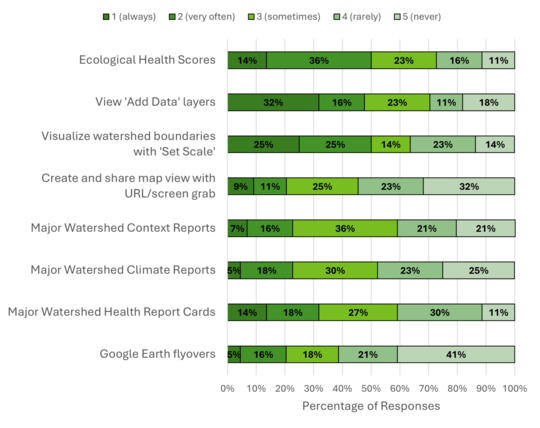
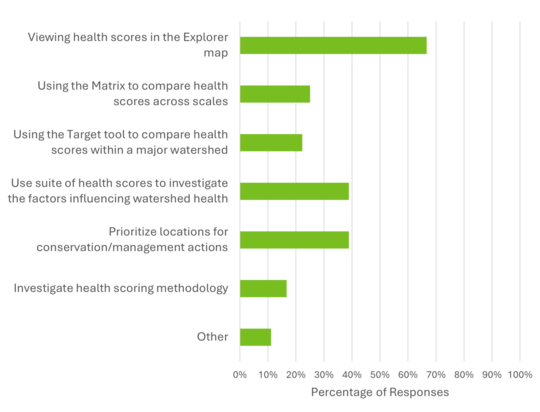
Use of application features: Respondents indicated that health scores, added data layers and watershed boundary navigation capabilities are the most used features. This reaffirms that the features that take the most time investment to maintain are receiving fairly even use. Further, while the matrix and targeting tools are also receiving some use, there may be opportunities to augment them to enhance their functionality for more users.
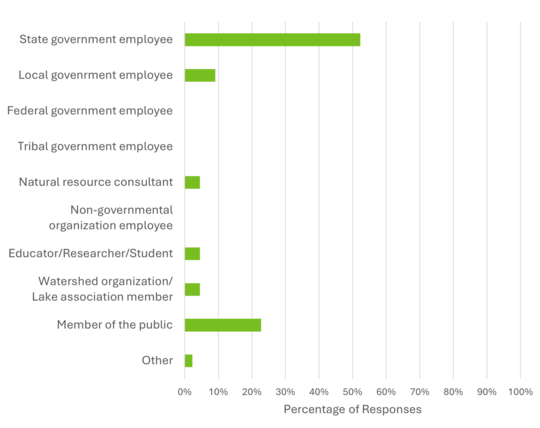
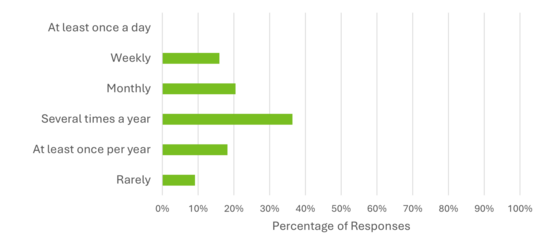
The figures below show the response of survey respondents based on the percentage of users who indicated that they used the WHAF Explorer. Responses to questions allowing written free response were also carefully reviewed and considered with many reflected above within the key takeaways.
I use the WHAF Explorer as a:
 How often do you use the WHAF Explorer?
 What is your purpose(s) of using the WHAF Explorer (select all that apply)?
 Please share how often you use each of these aspects of the WHAF Explorer on a scale from 1 (I always use this when I'm using WHAF Explorer) to 5 (I have never used this in the WHAF Explorer).
 If you use the Ecological Health Scores, which option best describes your use case (select all that apply)?
|