|
You may already be aware that the Minnesota Judicial Branch website makes available a wide variety of court forms, but if the court doesn't publish a form for your issue, where do you look? In this issue, we are highlighting other sources for finding legal forms.
Forms in Print
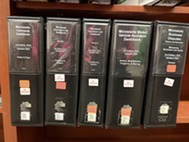
We have a wide variety of forms in print. We have previously covered civil litigation forms in this newsletter, but we have forms available for many other topics.
Minnesota CLE publishes several deskbooks that include forms. Two of the most popular cover estate planning and probate issues. Drafting Wills and Trust Agreements and Minnesota Estate Administration Deskbook are great resources for forms related to wills, trusts, and probate.
Minnesota CLE also publishes annotated forms on subjects including contracts, employment, commercial real estate, and business formation.
The State Law Library provides access to these forms in print, but we may also be able to email you a specific form upon request. Ask a Librarian for more information.
|
Online Forms
In addition to the courts' website, you can find reputable and free legal forms online. For real estate matters, the Minnesota Department of Commerce publishes Uniform Conveyancing Forms. These forms provide sample deeds, liens, and forms for property transfers related to probate, trusts, or marriage and divorce. The forms are all available for download as free PDFs.
LawHelpMN is another good source for forms. The LawHelpMN Forms are available in the format of a guided interview. You answer questions and a form is created based on your responses. Some of the forms are also available through the courts, but LawHelpMN lets you create forms for Power of Attorney, Healthcare Directive, Delegation of Parental Authority (DOPA), and debt collection demand letters.
Comprehensive Legal Forms
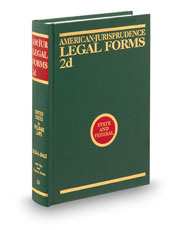
If a Minnesota form book doesn't have what you are looking for, West's Legal Forms and American Jurisprudence Legal Forms likely do. These comprehensive form sets include thousands of forms on nearly every legal topic. They are particularly useful for providing multiple variations on a form, so you can choose the language that best suits your situation.
West's Legal Forms and AmJur Legal Forms are both available in print at the State Law Library, but they are also available through our Westlaw subscription. You can access Westlaw for free at the State Law Library. We may also be able to email a specific form upon request.
|
Nolo Forms
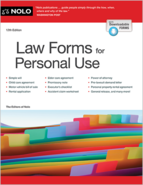
There are nearly 100 forms in Nolo's Law Forms for Personal Use. These forms cover a variety of scenarios and include helpful templates for borrowing or lending money, selling property, writing a demand letter, or providing care for a child or other relative. Many county law libraries around the state have this book in print, but you can also Ask a Librarian for electronic access and download editable forms.
|
If you stopped by the Minnesota Judicial Branch's booth at the Minnesota State Fair this year, you may have tried your hand at some legal trivia questions. As part of this year's Great Minnesota Get Together, librarians from the State Law Library compiled some trivia questions about the state's court system, laws, and legal history. If you didn't stop by, you can still test your knowledge at home. Here are a few of our favorite questions:
1. True or false: Minnesota had 2 Constitutions when it became a state.
2. Why do Minnesota judges wear robes?
a. Because it is cold in courtrooms, and they want to stay warm.
b. Because Rule 2.02 requires them to do so.
c. Because they might get mustard on their shirt during lunch, and no one wants to see that in the courtroom.
d. Tradition - while other ideas may be offered to explain it, it comes down to tradition.
3. Where was the first courthouse in Minnesota?
a. St. Paul
b. St. Peter
c. St. Anthony
d. Stillwater
4. Which of the following are not requirements to be a judge in Minnesota?
a. At least 10 years of legal practice in the State of Minnesota
b. Previous service as a district court judge
c. Ability to read Latin
d. All of the above
Answers
1. Technically true. The Minnesota Constitutional Convention was so politically fragmented that each faction established their own conventions and refused to sign the same copy of the Constitution. The two versions are nearly identical, but due to the rushed timeframe to create copies, there are some differences in punctuation and grammar. Find out more here: Minnesota Secretary Of State - Minnesota Constitution 1858.
2. B. While it is required by General Rule of Practice 2.02(a), the reason for the rule likely stems from tradition (although we suspect there may be some truth to the others as well!). See, Justice Sandra Day O'Connor on Why Judges Wear Black Robes.
3. D. In 1849, the first county courthouse in Minnesota Territory was completed on a donated site at Fourth and Chestnut in Stillwater. It was replaced in the 1860s, and that building still stands today.
4. D. To serve as a judge or justice in Minnesota, an individual must be eligible to vote, be at least age 21, and be "learned in the law" (meaning they are a licensed attorney-at-law). See, Judicial Selection in Minnesota.
Most of us who work in an office know how to use shortcuts like CTRL + C and CTRL + P to copy and paste, but did you know:
CTRL + Backspace: Deletes Entire Words
By holding the CTRL key, you can delete word by word. Place your cursor anywhere within a word and press CTRL + Backspace to remove the entire word instantly.
CTRL + Arrow Keys: Navigates by Words
Hold CTRL while pressing left or right arrows to jump between words instead of moving one character at a time. Using CTRL + up/down arrows lets you move between paragraphs.
CTRL + Enter: Send Emails Immediately
You can skip the mouse when sending emails in Outlook. Press CTRL + Enter to deliver your message instantly without clicking Send. Careful with this one!
CTRL + Shift + V: Paste as Plain Text
When copying from websites or formatted documents, use CTRL + Shift + V to paste without bringing unwanted formatting along. This keeps your documents clean and maintains consistent styling.
CTRL + K: Insert Hyperlinks Quickly
Add links in Word, Excel, Outlook, and many text fields on websites by selecting the text you want to create a hyperlink and pressing CTRL + K. The hyperlink dialog opens immediately—just paste or type your URL and press Enter.
These shortcuts work consistently across Windows applications and can reduce the time spent on routine editing and navigation tasks. They're particularly useful when working with lengthy documents or processing multiple emails. Give them a try!
|