
Important Update – COVID-19 Vaccine Waste Reporting
Michigan Dept of Health & Human Services sent this bulletin at 09/10/2021 01:20 PM EDT
This message was sent to AIM, FAB, Health Systems, INE, IAP, LHD Health Officers, LHD Medical Directors, MACI, MACI 2, PH Imms Leads, MCIR Region Contacts, COVID-19 Vaccine Providers, and Imms All Staff. I apologize for any duplications
Good Afternoon Immunization Partners,
Please review the following updates to the COVID-19 vaccine wastage process and ensure action be taken for complete reporting of COVID-19 vaccine waste/loss.
COVID-19 vaccine wastage is submitted by MDHHS to CDC. However, a key step to this process is that COVID-19 Vaccine Providers must report all wastage in the MCIR (doses which are broken, expired, drawn not used, etc.). To do so, providers must enter transactions in the MCIR Outbreak inventory as well as ensure submission of the NEW COVID Return/Wastage Report in MCIR. Both of these steps are required to fulfill waste reporting (following the same process as VFC vaccine). For step-by-step guidance on this process, follow our steps outlined below.
Important: Many offices may have already performed inventory transactions to deduct previously wasted doses but have NOT yet submitted a COVID (Outbreak) Return/Waste Report in MCIR. To capture such previously-reported doses and submit, proceed to step 3 below.
As a reminder, COVID-19 vaccine is NOT to be returned to the distributor and instead must be disposed of properly.
REPORTING COVID-19 VACCINE WASTE (Inventory Transactions + NEW COVID Return/Wastage Report)
Follow the steps below for entering transactions and submitting a waste report. If you are also a Vaccines for Children (VFC) Provider, you will find that the transactions chosen may differ from those for VFC vaccine. You will also notice there are 2 separate links for “VFC Return/Waste Report” and “Outbreak Return/Waste Report”.
-
In your MCIR Outbreak Inventory, select the vaccine and “Add New Transaction”. Enter date, doses affected, and a detailed comment.
- If you need step-by-step guidance in locating the inventory and selecting transactions, see the linked tip sheets in the table below.
- Select the appropriate “Action” and “Reason” to remove the dose(s) from MCIR Outbreak Inventory. See table below for details on which “Action” and “Reason” to select:
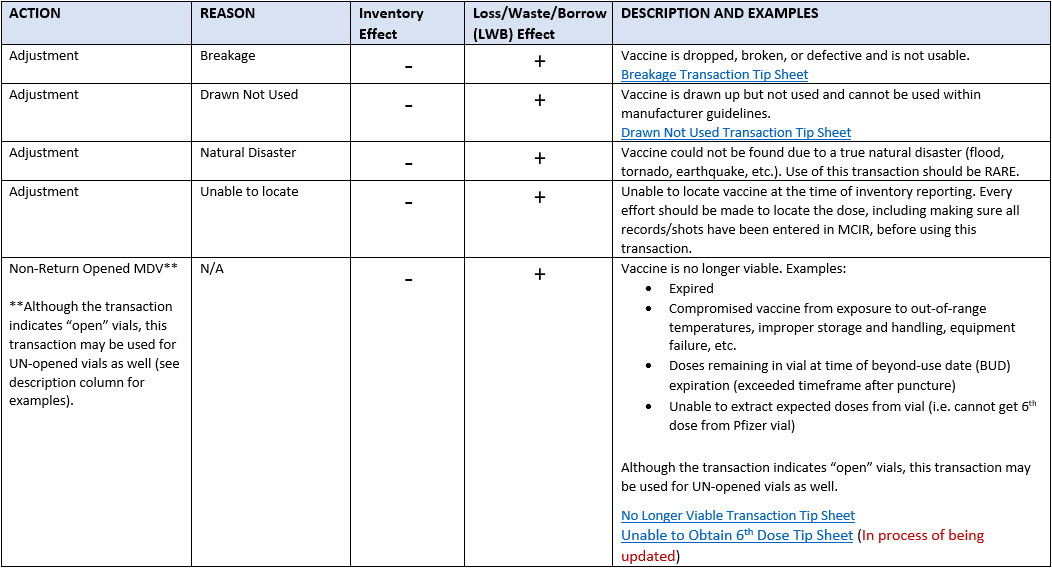 *Other transactions appear in drop-downs but the above transactions are those that are to be used for COVID vaccine wastage reporting. As a reminder, COVID-19 vaccine is not returned to distributor and therefore “return to distributor” should NOT be used.
- *NEW* Create and submit a COVID Return/Waste report in MCIR
- From MCIR home screen select “Return/Waste Reporting” from the “Vaccine Mgmt” section.
- Click “Create New Outbreak Return/Waste Report”. It may take a few moments to generate the report.
- Check the boxes of all vaccine being reported (They may be auto-selected).
- In the “Action Plan”, identify any steps that will be taken to mitigate losses going forward.
- In the “Notes”, include any corrections to transactions reported if applicable (i.e. if a vaccine was entered as Unable to Locate but is actually Drawn not Used). Also include any further details regarding the waste.
-
Submit for approval.
- Provider reports will go to the LHD, followed by MDHHS.
- Ensure proper disposal as described below.
PROPER DISPOSAL
Do not attempt to return the vaccine to the distributor. Instead, dispose of wasted vaccine properly:
- Disposal must be done in accordance with local regulations with appropriate steps taken to ensure proper disposal. Therefore, dispose of wasted/expired vaccine vials (with remaining liquid) by placing them into the Sharps container and treated as medical/biohazard waste.
- Do not draw up remaining liquid and dispose of it down the sink drain.
- Vaccine disposal information was also shared in a previous email (also discussing the 2 options for disposal of empty vials). For your reference, that email is also attached.
Thank you for ensuring accountability for COVID-19 vaccine in Michigan.
If you have questions, please contact checcimms@michigan.gov.
Thank you,
MDHHS Division of Immunization

|
If this email was forwarded to you and you would like to receive updates from MDHHS directly, please sign up here. |
| STAY CONNECTED: | |||||||

|

|

|
 |
||||
SUBSCRIBER SERVICES:
Manage Subscriptions | Unsubscribe All | Subscriber Help