New Procedure for Resetting Your SOM Network Password
Michigan Civil Service Commission sent this bulletin at 10/21/2013 01:31 PM EDTGood Afternoon Employees,
Civil Service and DTMB were made aware of the difficulty you have when trying to reset your SOM network passwords (for SharePoint Intranet access). We believe we now have a solution that can be easily managed by all parties.
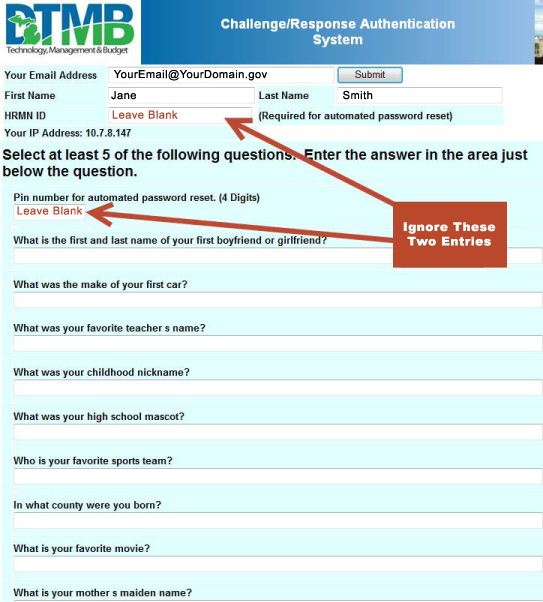
Later this week, you will receive a time sensitive email that has an expiration date. The email will come from "DTMB-CSC-Security-Configuration" with the subject line, "DTMB Client Service Center Challenge Response System" and include a link to the Challenge Response form. Below is a sample of the form for you to review. This form collects data used to verify the identity of people calling to have a password reset. It is also often used to set up an automatic password tool which will not work for you because you are on a different domain. Therefore we are including modified instructions for completing the form below.
IMPORTANT NOTE: You should not fill in your HRMN ID or select a PIN number.
Please review this process and forward any questions within the next few days to hrmn-help@michigan.gov. Next, we will set a date for the CSC to send you the email with a link to complete your Challenge/Response form. Once your form is on file, below is how the new procedure will work.
Procedure for resetting your SOM password
When you discover that your SOM password has expired, please call the DTMB Client Service Center. If you are in the Lansing area the number is 517-241-9700. For those outstate the number is 800-968-2644.
- At the opening announcement you will be asked to enter your HRMN ID or if you don’t have a HRMN ID to press Zero.
- Press Zero
- You will be asked select 1 if this is a new issue or 2 if this is an existing issue. Please press 1
- You will be asked to press 1 if you wish to reset your network password. Please press 1
- You will hear a message to please wait for the next available agent
- When the agent answers the phone, please identify yourself and tell them you that you are a Non-SOM customer, and ask the agent to please reference procedure #432.
- By referencing this procedure, the agent will know that your account needs special handling and will do the following
- Ask you the Challenge/Response questions to validate your identity
- Reset your password for you
- Have you test the new login before ending your call.