 |
|
Tips for Success!
|
Is your agency still accumulating overlap exceptions that are delaying payment?
Well look no further! Here are 3 steps to resolve overlap exceptions in 5 minutes or less.
1. Determine what type of overlaps you can resolve yourself. These include:
-
Staff Overlap - Same Provider: This occurs when the Staff Provider was clocked in for more than one Person at the same time
-
Staff Overlap - Same Provider, Different Program: This occurs when the Staff Provider was clocked in for more than one Person each of different programs at the same time
-
Client Overlap: This occurs when two or more Staff Providers were clocked in for the same service for the same Person at the same time through the same agency
-
Client Overlap – Different Program: This occurs when two or more Staff Providers were clocked in for different service for the same Person at the same time through same agencies
2. Where to find pending exceptions
- Services that have an overlap exception can be viewed by selecting the count for the relevant exception in the “Actions” section of the home page
- Exceptions may also be viewed by searching via the Services tab and entering search parameters for the exception
- The EVV Services Overlap Report
 The counts in the table are hyperlinks, which redirect to the Services Search Results page which lists the services included in the count.
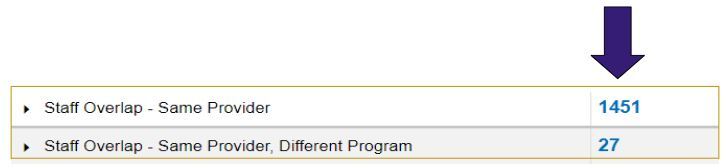 3. Resolving Overlaps
Overlaps can be resolved by updating the service start and/or end times or by discarding a conflicting service / shift.
For example: If Staff A completes their shift from 5am to 1pm and Staff B clocks in from 1am to 5am, the service would prompt an overlap exception due to the 1 minute overlap at 5am.
This can be corrected by editing either the clock in or clock out at 5 am by one minute. Once one of the overlapping services is located, click the details button to open details of the service. Then click the blue "View Overlap Service" link to view the overlapping information
Encouraging staff to wait 1 full minute between punches can also help prevent overlapping shifts.
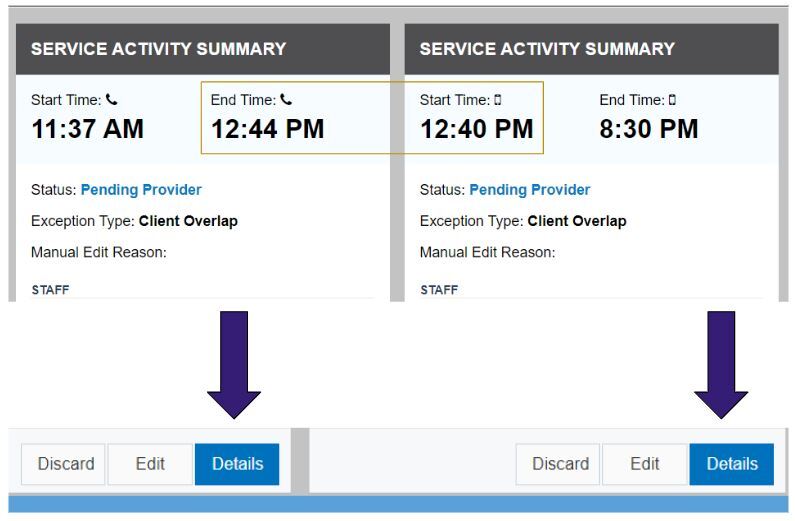 This will open the connected overlapping service in a new tab, so that the two services can be reviewed side by side
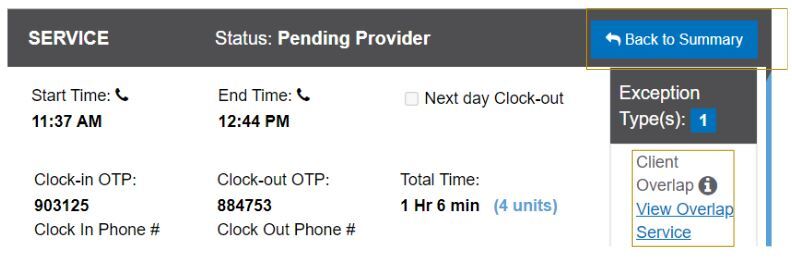 To edit or discard a Service that has Overlap exception, click “Back to Summary” button on the Service which you want to edit / discard
NOTE: Don't forget to SAVE and SUBMIT changes so the service can be reviewed by MDH before the 30-Day Deadline.
|