|
COMPAS NEWSLETTER
April 2025
|
|
Data Makes the 'Rockin' World Go 'Round'...!
The COMPAS data migration team is an integrated team comprising members from DPA and OIT, vendor partners from Ad Hoc and CGI, and soon agency users who have agreed to help the team validate migrated date.
-
Data mapping: In this step, team members are mapping data from legacy systems into the COMPAS application. Vendor partner CGI is helping to map data from legacy fields in CPPS to COMPAS. Business users are being engaged to ensure the accuracy of the mapping.
-
Data extracts: Vendor partner Ad Hoc is leading the effort to extract data from legacy systems and to transform and prepare it for upload to COMPAS.
-
Data loads: Vendor partner CGI is working closely with Ad Hoc to load data extracts from CPPS and with subject matter experts from CPU to upload data into COMPAS reference tables.
-
Evaluation and correction: Team members evaluate and correct errors that occur during the data migration process. Once errors are corrected, the data is reloaded.
Data migration is making great progress! Various employee-related data elements have been extracted from CPPS and loaded into COMPAS. Additionally, data has been defined and loaded into 40+ reference tables that will support user data entry when COMPAS goes live.
Next Steps for Data Migration
The COMPAS implementation team will continue working to map, extract, and load data. In the meantime, agencies have named data validation “points of contact” (POCs). In the coming months, these POCs will be invited to access COMPAS and validate that the data migrated for their agencies satisfies the 3Cs (correct, clean, complete).
Caro Timm, the Queen of data migration for COMPAS (get it?) had this to say, “Awesome data is essential to the success of COMPAS project; it truly does make the 'rockin' world go 'round'.” My team is taking care to deliver great data for future COMPAS users. We totally want COMPAS to rock your world (in the best way, of course)!
|
|
Click to edit this placeholder text. |
|
Explore the Power of the Advanced Grid in COMPAS
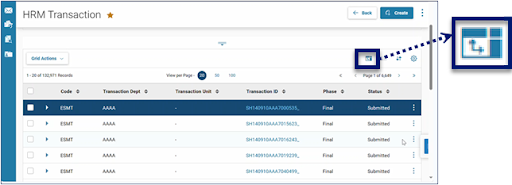
COMPAS delivers powerful, spreadsheet-like capabilities right within the application. These features can be accessed via the Advanced Grid icon that appears just above the grid on the right-hand side of the COMPAS screen (see picture below).
Image 1: How to Access Advanced Grid Features in COMPAS
The Advanced Grid can help you analyze data without leaving the system, making your work easy and efficient! Features of the Advanced Grid include:
- Pin specified columns to the left or right of your screen.
- Autosize columns to fit the longest string of data.
- Group data into sections, based on how you wish to see it.
- Filter your results for a specific value.
- Create pivot tables to analyze your data.
- Aggregate data using functions like average, count, and sum.
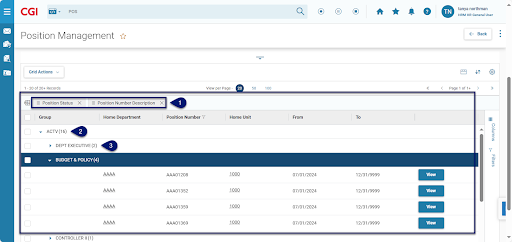
The picture below shows the “Group By” feature in action. In the example, Position Management data has been grouped first by Position Status and then by Position Number Description (seen at Marker 1). As a result, the data has been organized first by Position Status, for example “Active” or “ACTV,” (seen at Marker 2) and then by Position Number Description, for example “DEPT EXECUTIVE” (seen at Marker 3).
Image 2: Use of the Advanced Grid “Group By” Feature
Visit the COMPAS Learning Center to see Advanced Grid Features in action.
|
|
 As a COMPAS user, you will be assigned one or more Business Roles depending on the nature of your work. Business Roles determine the content of your Home Page. For example, the Quicklink tiles that display on your Home Page can be tailored by Business Role. As you switch between the Business Roles assigned to you, your Quicklinks will change, providing you with easy access to the most used transactions and resources for your role. Five Business Roles have been designed to date in support of COMPAS Payroll Modernization. These include:
- HRM HR General User
- HRM Payroll General User
- HRM Labor Allocation General User
- HRM Central HR General User; and,
- HRM Central Payroll General User
Visit the COMPAS Learning Center to learn more about Business Roles and Home Pages.
|
|
Click to edit this placeholder text. |
|
April Riddle
The first five correct responses will receive a prize! Riddle me this:
I run and never walk. I have a mouth and never speak, a head and never weep. I have a bed and never sleep. What am I?
Please email SoC_COMPAS@state.co.us with your answers. The correct answer and winners list will be published in next month’s newsletter.
We'd Love to Hear From You
Have ideas for future newsletter topics or office hours? Is there something you'd like to hear more about? We are all ears. Your feedback helps shape content that matters to you. SoC_COMPAS@state.co.us
|
|
|
|