COVID-19 Vaccine Communication from the Immunization Program Office
Today's topic: Federal vs State Allocated COVID-19 Doses and ASIIS
Due to the Pandemic Onboarding for COVID-19 vaccines, the Arizona Immunization Program Office would like to remind you of reporting requirements & how to add allocated doses to your ASIIS inventory.
Important Notes:
- Providers must enter dose administered data into ASIIS within 24 hours of administration.
- Providers must also submit their daily inventory to CDC VaccineFinder.
Arizona allocation
- Pandemic providers that receive their COVID-19 doses from Arizona, must receive their doses in ASIIS.
- When the doses arrive, mark them as Received in ASIIS
- Log into ASIIS
- Go to Orders/Transfers> Create/View Orders> Select arrow for Inbound Order/Transfer
- Verify the expiration date, lot number, and quantity of doses
- ASIIS may show 12/31/2069 as a placeholder for the expiration date; providers are expected to enter the correct expiration date when needed
- Click the Receive button to receive the doses into the ASIIS Inventory
- Pandemic providers that are allocated doses through Arizona must use the funding source ‘PAN’ in ASIIS.
Federal allocation
- Providers that receive their doses from a federal allocation (not from Arizona) are not required to enter their doses into the ASIIS inventory; however providers can enter their doses into the ASIIS inventory.
- To add doses into ASIIS:
- Log into ASIIS
- Go to Lot Numbers> Search/Add> enter the lot number of the doses that need to be added and click ‘Search’> click ‘Add’
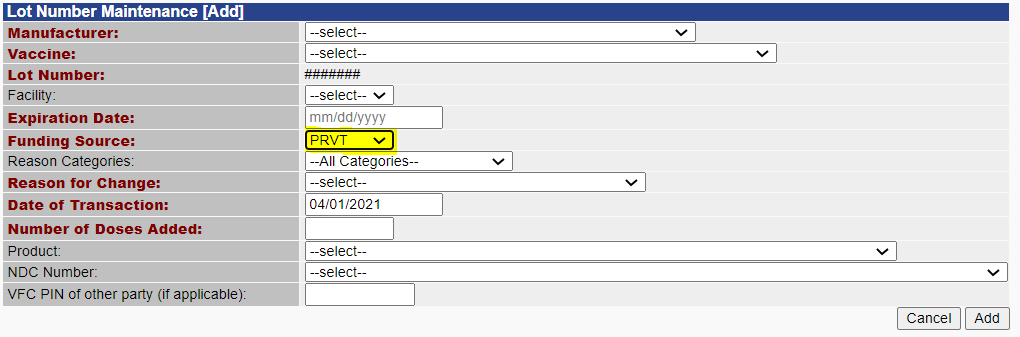
- Providers that are allocated doses federally must use the funding source ‘PRVT’ in ASIIS.
The Immunization Program Office is here to assist you!
Independent Pandemic Training can be completed at this link here.
|